How to Earn Recurring Revenue as a Web Designer (2026)
The fastest way to earn recurring revenue as a web designer is to stop selling websites as one-time projects and start selling ongoing outcomes: maintenance, monitoring, hosting management, and small monthly improvements billed as a flat retainer. Care plans are the most reliable starting point because every client already needs one, most just do not know it yet

Khul Anwar
Growth
TL;DR: To earn recurring revenue as a web designer, stop selling websites as one-time projects and start selling ongoing outcomes billed as a flat monthly fee. The five models that work best in 2026 are website care plans, managed hosting, a monitoring and reporting retainer, a growth (SEO and content) retainer, and productized monthly design hours. Start with care plans priced at roughly $49 to $199 per month, sell them to clients you already have, and make maintenance a standard part of every project instead of an optional add-on. The single biggest reason care plans get cancelled is that the work feels invisible, so make a monthly monitoring report the visible core of the offer.
The fastest way to earn recurring revenue as a web designer is to stop selling websites as one-time projects and start selling ongoing outcomes: maintenance, monitoring, hosting management, and small monthly improvements billed as a flat retainer. Care plans are the most reliable starting point because every client already needs one, most just do not know it yet. Below is how to build each model, the one most freelancers overlook, and the mistake that keeps care plans from selling.
Why Project Work Quietly Caps Your Income
Project work has a ceiling built into it. Every month you start at zero and rebuild your revenue from scratch. Land a $5,000 site, and you have to land another one next month just to stand still. Your income is only ever as stable as your next signature.
There is a second, less obvious problem. When you hand off a finished site and walk away, you are also handing away the most valuable asset you just created: a live relationship with someone who trusts your work and whose website is now your responsibility in the client's mind, whether or not it is in your contract.
Recurring revenue fixes both. A book of 20 clients paying $99 a month is $1,980 in predictable income before you take on a single new project. It also keeps you in the relationship, which is where nearly all repeat work and referrals come from.
The 5 Recurring Revenue Models, Ranked by How Fast You Can Start
1. Website Care Plans (Start Here)
A website care plan is a flat monthly fee to keep a site secure, updated, backed up, and working. Typical pricing runs from $49 a month for a simple brochure site to $199 and up for anything with a store or heavy plugin load.
This is the best entry point for one reason: the need already exists. Every site you have ever built is slowly drifting out of date right now. Plugins update, SSL certificates expire, contact forms break silently, and platforms push changes that quietly break layouts. The client does not see any of this until something visible goes wrong, and then they call you in a panic. A care plan turns that unpaid, stressful emergency into paid, predictable work.
2. Managed Hosting
Instead of sending clients to buy their own hosting, you resell it with your management layer on top. You buy reliable hosting at wholesale, bundle it with your oversight, and bill a single monthly rate. Margins are modest on the hosting itself, but it is the easiest recurring line to add because it requires almost no new skills, and it locks the client into your ecosystem.
The catch: hosting alone is a thin, easily-compared commodity. Clients can Google what hosting costs. Bundle it inside a care plan so you are selling peace of mind, not a server.
3. Monitoring and Reporting Retainer
This is the model most designers overlook, and it is the one with the best margin.
Here is the insight almost nobody acts on: clients do not cancel care plans because the price is too high. They cancel because nothing appears to happen. Month after month the invoice arrives and the site looks exactly the same, so the client starts to wonder what they are paying for. The work is invisible, so the value feels invisible.
A monitoring and reporting retainer fixes that by making the invisible visible. You continuously watch the client's site for problems, catch them before the client does, and send a short monthly report that shows exactly what you checked, what you caught, and what you fixed. The report is the product. It is proof of value delivered on a schedule, and proof of value is what keeps a retainer alive.
This is where the right tool does the heavy lifting. Instead of manually writing a report each month, you let a monitoring platform generate it for you. Here is what that proof-of-value document looks like in practice:
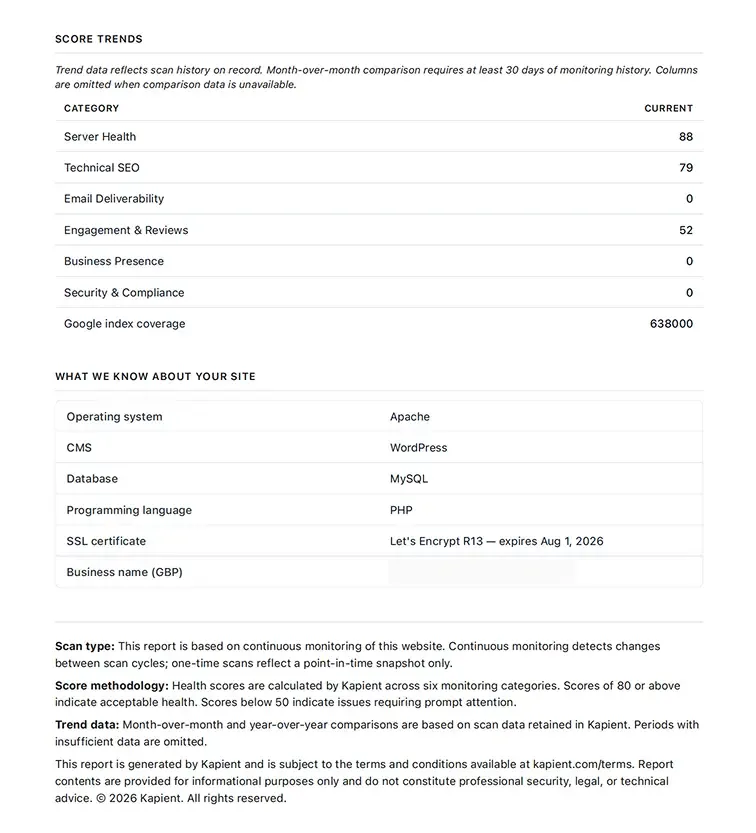
A Kapient automated report summarizes every scan, flagged issue, and fix over the month, ready to send straight to the client as evidence the retainer is working.
The margin is strong because website monitoring can be automated. You are not trading an hour of labor for every hour billed. You set up continuous scanning once, and the tooling does the watching. Your time goes into the parts that need a human: interpreting what came up and fixing it.
4. Growth Retainer (SEO and Content)
For clients who want their site to do more over time, not just stay alive, you offer ongoing improvement: on-page SEO, fixing technical issues that hurt rankings, publishing content, tracking their Google Business Profile and reviews.
This commands the highest rates because it is tied to growth rather than upkeep, but it also demands the most skill and is the hardest to keep clients on, since results take months.
Start clients on a care plan first. Once they trust you with the basics, the growth retainer is a natural upsell.
5. Productized Monthly Design Hours
Sell a fixed block of design and development time each month at a flat rate: "10 hours a month for $800, use them for whatever you need." Clients love the flexibility, and you get predictable income for work you already do. The risk is scope creep, so cap the hours clearly and bill overflow separately.
The One Mistake That Kills Care Plan Sales
Most designers present the care plan as an optional add-on at the end of a project, usually in a tired sentence like "and I also offer maintenance if you want it." Framed that way, it sounds like an upsell, and clients decline upsells by default.
Designers who close care plans consistently do the opposite: they make maintenance a standard, non-optional part of every project from the first proposal. The site build and the care plan are quoted together, as one thing.
As WPMU DEV notes in its guide to selling care plans, designers who simply stopped presenting maintenance as optional went from rarely closing it to closing it almost every time. The message is not "you can pay me more to maintain this." It is "this is how a professional website works. You build it, and you keep it maintained, the same way you service a car."
That single reframe, from optional add-on to standard practice, is the difference between closing care plans occasionally and closing them almost every time. You are not asking for extra money. You are telling the client how the thing they are buying actually works.
How to Launch Your First Recurring Offer This Month
You do not need all five models. You need one, sold well, to the clients you already have.
Pick care plans as your first offer. The need is universal and the pitch is easy.
Build three tiers. Something like $49, $99, and $199 a month, separated by how much is monitored and how fast you respond. Tiers give clients a choice between yes and yes, instead of yes and no.
Go back to every past client first. These are your warmest leads. A short, honest message works: their site needs ongoing care to stay secure and working, and you now offer exactly that.
Make monitoring the visible core. Whatever tier they pick, the thing they see every month is a report showing you are watching their site and catching problems early. That report is what makes the fee feel worth it.
Make it standard for all new projects going forward. Quote the build and the plan together, every time.
Where Monitoring Fits, and Why It Makes the Whole Thing Easier
The models above all lean on the same quiet engine: knowing what is happening on your clients' sites without logging into each one every day. That is the practical bottleneck. The moment you are responsible for more than a handful of sites, you cannot manually check them all, and manual checks miss the silent failures anyway. A broken contact form does not throw an error. It just stops sending leads, and neither you nor the client notices until a customer complains that nobody called them back.
This is the gap a tool like Kapient is built to fill. Rather than describe it, here is how it maps onto the exact workflow above, in three steps.
Step 1: Kapient catches the silent failures for you.
Kapient continuously scans each client site across dozens of technical and quality factors, from SSL and redirect problems to broken forms, slow pages, SEO issues, and Google Business Profile and review changes. The broken contact form from earlier, the one that throws no error, shows up here before a single lead is lost:
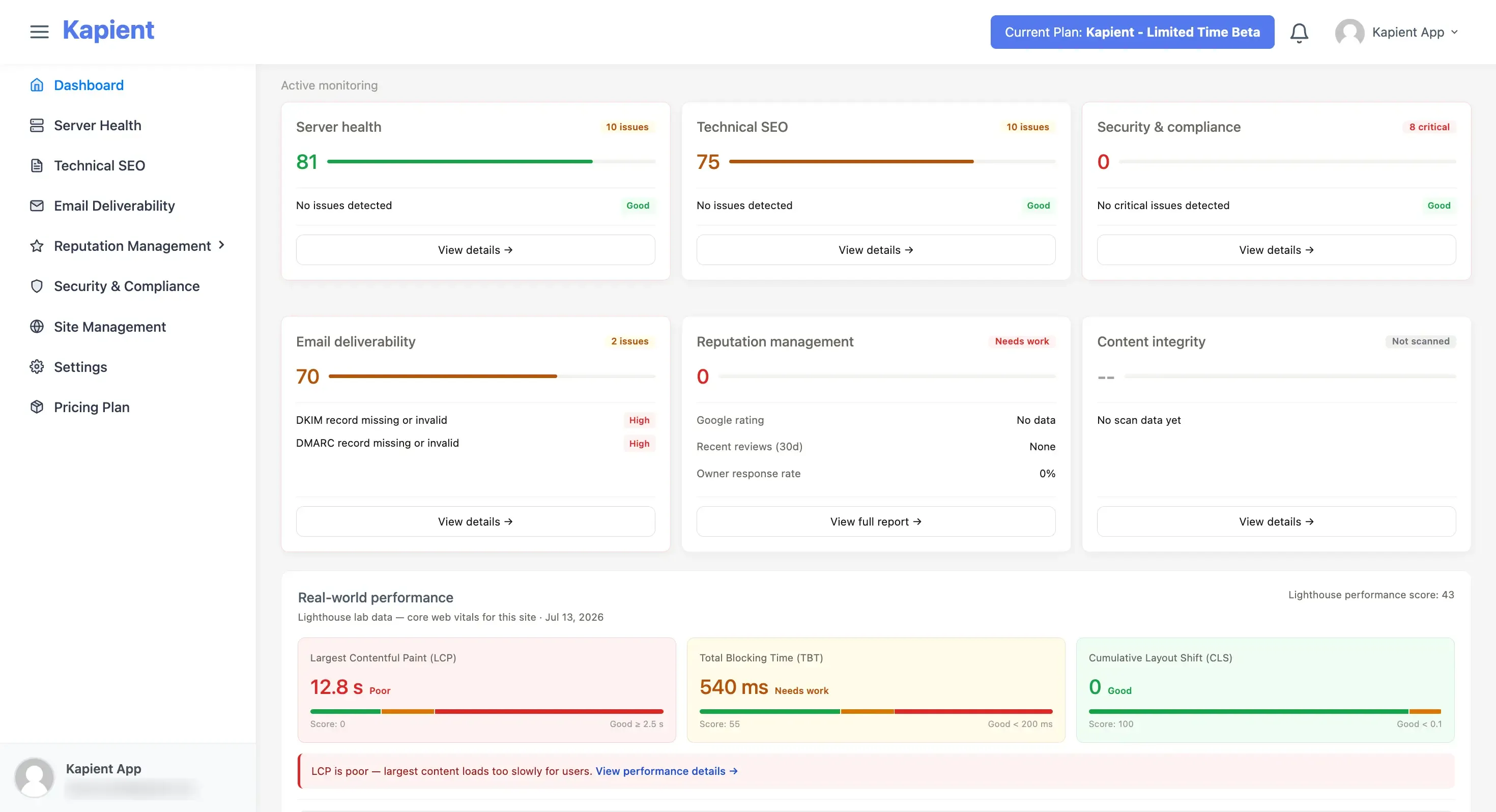
Kapient surfaces the silent failures manual checks miss, so you find the broken form instead of the client's lost customer finding it.
Step 2: It tells you how to fix it, in plain English.
A normal monitoring tool sends a cryptic alert and leaves you to figure out the rest. Kapient reads the site's actual setup, including hosting, CMS, and plugins, and generates repair instructions written for that specific site rather than generic help-article advice:
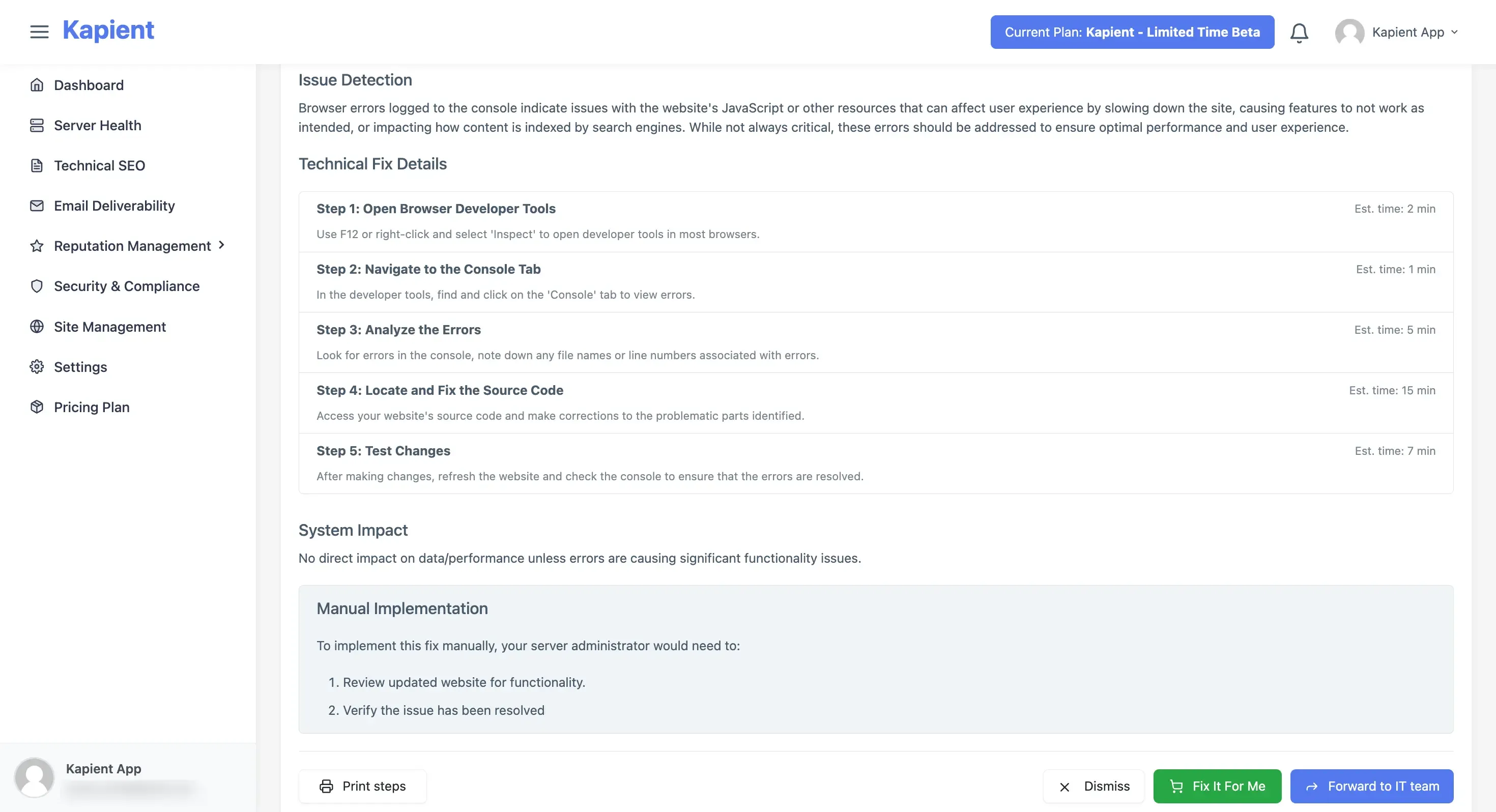
Instead of a vague warning, you get step-by-step instructions tied to the client's real stack, so fixes take minutes instead of a research session.
Step 3: It hands you the proof.
Every scan and fix rolls up into the automated monthly report shown earlier, the document that keeps the retainer from feeling invisible.
Put together, those three steps turn the hardest part of recurring revenue, staying on top of many sites at once and showing clients the work, into something that mostly runs itself.
Recurring revenue is not a different business from web design. It is the same business, held onto instead of handed away. The clients are already yours. The need is already there. The only thing standing between project-to-project income and predictable monthly revenue is deciding to keep the relationship going, and building one simple offer that makes keeping it worth paying for.
Frequently Asked Questions
How much recurring revenue can a web designer realistically make?
A book of 20 care plan clients at an average of $99 per month produces about $1,980 in predictable monthly income, or roughly $24,000 a year, before any new project work. Designers who add higher tiers and growth retainers on top commonly build recurring revenue into their single largest and most stable income line.
What is a website care plan and what should it include?
A website care plan is a flat monthly service that keeps a site secure, updated, and working. Core inclusions are software and plugin updates, regular backups, security and uptime monitoring, and technical support. Higher tiers add faster response times, performance and SEO monitoring, and a set number of monthly edit hours.
How much should I charge for a website care plan?
Most care plans range from about $49 to $199 per month. Simple brochure sites sit at the low end, while sites with e-commerce, membership features, or heavy plugin loads justify the higher tiers because they take more time to maintain and carry more risk when something breaks.
Which recurring revenue model is best for a beginner?
Website care plans are the best starting point. The need is universal, every past client is a warm lead, and the pitch is simple because you are protecting work the client already paid for. Once care plans are running, hosting, monitoring, and growth retainers are natural additions.
Why do clients cancel website maintenance plans?
The most common reason is that the work is invisible. When nothing visibly changes on the site month to month, clients begin to question the fee. A short monthly report that shows what was checked, caught, and fixed makes the value concrete and is the single most effective way to reduce cancellations.
How do I monitor multiple client websites at once?
Manual checks do not scale past a handful of sites and miss silent failures like broken contact forms. Continuous monitoring tools scan every client site automatically, alert you to problems before clients notice, and generate reports you can pass straight to clients. This is what makes a monitoring retainer profitable rather than time-consuming.
Written by
Khul Anwar
Growth
Khulanwar leads content and growth at Kapient, where the team helps small businesses and agencies keep their websites healthy, fast, and compliant. He writes about website monitoring, technical SEO, and the maintenance work that quietly keeps sites from breaking after launch.
Related articles

10 Common WCAG Failures and How to Fix Them
September 22, 2026

Website Accessibility for Agencies: Turning Compliance Into a Service
September 16, 2026
10 Best UptimeRobot Alternatives for 2026
September 10, 2026
How to Check if Your Website Meets WCAG Accessibility Standards
September 10, 2026