Website Accessibility for Agencies: Turning Compliance Into a Service
Most agencies treat accessibility as an afterthought, if they think about it at all: something a client might ask for, handled once, then forgotten. That is a mistake on two fronts. It leaves your clients exposed to a fast-growing category of legal risk, and it leaves real recurring revenue on the table.

Khul Anwar
Growth
TL;DR: For a web agency, accessibility is both a growing client risk and a real revenue opportunity. Digital accessibility lawsuits number in the thousands each year and increasingly target the small businesses agencies serve, so an inaccessible site you built is a liability for your client and a reputation risk for you. Agencies can turn this around by building accessibility into every project (choosing accessible themes, testing against WCAG 2.1 AA), offering audits and remediation as paid work, and, most durably, adding continuous accessibility monitoring to care plans, because a site drifts out of compliance the moment a client starts adding content. That last piece turns a one-time fix into recurring revenue and ongoing client protection.
Most agencies treat accessibility as an afterthought, if they think about it at all: something a client might ask for, handled once, then forgotten. That is a mistake on two fronts. It leaves your clients exposed to a fast-growing category of legal risk, and it leaves real recurring revenue on the table. The agencies getting this right have flipped it, they treat accessibility as a standard part of how they build, a service they sell, and an ongoing responsibility they monitor. This guide covers how to do that: why accessibility matters for your agency specifically, how to build it into your work, and how to turn it into a durable revenue line rather than a one-off task.
Why Accessibility Is an Agency Issue, Not Just a Client One
When a site you built is inaccessible, the consequences land on both your client and you.
Your clients face real legal exposure. Digital accessibility lawsuits topped 5,000 in the US in 2025 (federal and state combined), and more than 25,000 have been filed since 2018, making this one of the fastest-growing areas of litigation. The targets are not just big brands: the majority of defendants are businesses under $25 million in revenue, though larger companies are a growing share. E-commerce is especially exposed, accounting for roughly 70% of all cases. And the rise of AI-assisted complaint drafting has made it cheap to sue at scale, with an estimated 35,000 to 50,000 demand letters sent in 2025, roughly seven to ten for every lawsuit actually filed. For a client, an inaccessible website is a lawsuit waiting to happen.
You carry the reputational risk. When a client gets a demand letter over a site you built, the first question they ask is why you did not build it accessibly. Even when your contract does not make you legally responsible, in the client's mind you are the expert who should have known. Accessibility problems on your portfolio are your problem, whether or not the contract says so.
It is also the right thing, and good business. Roughly one in four adults has a disability. An inaccessible site turns away real customers and shrinks your client's addressable market. Framing accessibility purely as legal defense undersells it, it also expands reach, improves SEO (much of accessibility overlaps with technical SEO), and signals a quality build.
The takeaway for an agency: accessibility is not a niche request to handle when asked. It is a standard of quality and a risk you manage on behalf of every client.
What Accessibility Actually Requires: WCAG 2.1 AA
The standard to build and test against is the Web Content Accessibility Guidelines (WCAG), at Level AA of version 2.1. This is the benchmark courts effectively use, since the ADA and most other accessibility laws do not publish their own technical checklist and rely on WCAG instead.
For your team, the machine-checkable essentials cluster into four areas, which is a useful way to structure both your builds and your testing: images (descriptive alt text), color contrast (readable text, at least 4.5 to 1), navigation (full keyboard operability, visible focus, logical headings), and forms (properly labeled fields). Beyond those, manual testing for keyboard and screen reader usability covers what automated checks cannot. Our guide to checking WCAG accessibility compliance covers the full standard and testing process, and for WordPress-specific builds, WordPress accessibility covers the platform details.
A note to give every client: avoid accessibility overlay widgets. These "one-line-of-code, instant compliance" tools do not actually make a site compliant, interfere with real assistive technology, and have repeatedly failed as a legal defense. Recommending one exposes your client to the exact risk they think they are avoiding. Real accessibility comes from building the site correctly.
How to Build Accessibility Into Every Project
The most efficient accessibility is the kind you never have to retrofit. Bake it into your standard process.
Start with accessible foundations. Choose accessibility-ready themes and component libraries, so your team inherits good structure instead of fixing it later. Establish accessible defaults for color palettes, typography, and focus states in your design system.
Make it part of your build checklist. Add WCAG checks to your standard QA: alt text on images, keyboard navigation, contrast, form labels, heading structure. Catching issues during the build costs a fraction of fixing them after launch.
Test before every handoff. Run an automated scan and a quick manual keyboard and screen reader pass before you deliver. A site that ships accessible is one you never have to remediate under pressure later.
Educate the client. The biggest threat to an accessible site is the client adding inaccessible content after you hand it over. A short guide on writing alt text and using headings properly protects your work and positions you as the expert.
Turning Accessibility Into Agency Revenue
Here is where accessibility stops being a cost and becomes a business line. There are three levels, and the third is where the durable money is.
Level 1: Accessibility Audits
Offer a paid accessibility audit as a standalone service: you assess a client's site (or a prospect's) against WCAG 2.1 AA and deliver a prioritized report of issues. This is an easy entry point, a clear deliverable clients understand, and a natural door-opener to remediation work. It also works as a sales tool: an audit that surfaces real risk on a prospect's existing site is a compelling reason to hire you.
Level 2: Remediation Projects
Fixing the issues an audit finds is project work you can scope and bill: correcting markup, fixing contrast, adding labels, rebuilding inaccessible components. For clients with existing inaccessible sites, remediation is often urgent, especially if they have received a demand letter, which makes it high-value work.
Level 3: Ongoing Accessibility Monitoring (the Recurring Play)
This is the durable one, and the reason accessibility fits so naturally into an agency's recurring-revenue strategy. Audits and remediation are one-time. But accessibility does not stay fixed, a site drifts back out of compliance the moment the client publishes a new post without alt text, updates a theme that breaks contrast, or adds a plugin with an unlabeled form. None of this throws an error, so nobody notices until it is a problem.
That ongoing drift is a recurring service. By monitoring your clients' sites for accessibility continuously, you catch new barriers as they appear, keep clients protected between audits, and earn predictable monthly revenue for doing it.
The Delivery Problem: You Cannot Monitor Accessibility by Hand
The catch with ongoing accessibility monitoring is the same one that affects every recurring service: doing it manually does not scale. Manually re-testing every client site against WCAG every week, across a portfolio, is not realistic, and the majority of those checks would find nothing changed. Manual accessibility monitoring would consume more time than the revenue justifies, which is why most agencies never offer it, even though clients clearly need it.
The only way it works as a profitable service is to automate the detection, so your team's time goes to fixing real issues, not hunting for them.
This is where Kapient makes accessibility monitoring deliverable at agency scale. Under its Security and Compliance dashboard, Kapient runs a WCAG Accessibility check against the WCAG 2.1 AA standard on every client site, continuously, and gives each site an accessibility score with a compliance breakdown across images, color contrast, navigation, and forms, the exact areas where client content changes introduce problems.
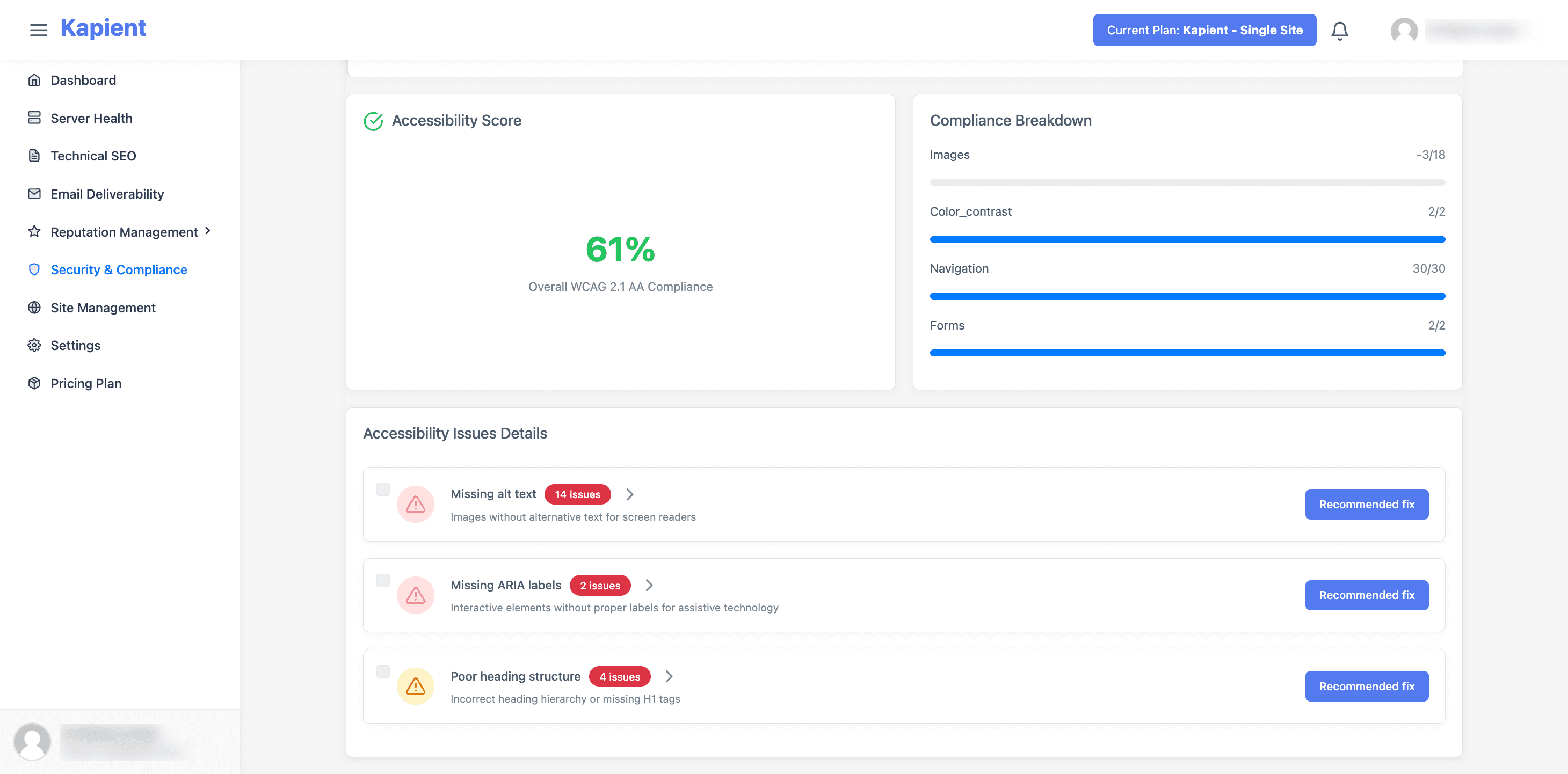
It runs as part of a scan across more than 74 technical and quality factors, so accessibility is monitored alongside SSL, uptime, speed, broken links, and SEO health, on one system, across your whole portfolio.
When a client's site drifts out of compliance, you get an email alert, and in your Kapient dashboard the flagged issue carries a "Recommended fix" button with plain-English steps, so your team goes straight from detection to fix.
Because Kapient monitors from outside the site rather than as a plugin, it works the same across WordPress, Wix, Squarespace, and custom builds, and adds no load to client sites. And the continuous score becomes the proof-of-value in your monthly client report, concrete evidence that you are actively protecting them, which is what keeps the retainer worth paying for.
To be clear on scope for your clients: automated monitoring covers the machine-detectable share of WCAG, the same share the automated lawsuit-scanning tools target, so it addresses the most common basis for a complaint. It does not replace periodic manual keyboard and screen reader testing, and it is not legal advice. Positioned honestly, that is a strong offer: continuous protection against the most common and most litigated issues, with manual audits layered in periodically.
Putting It Together
For an agency, the accessibility opportunity is a ladder. Build accessibility into every project as a standard of quality. Offer audits as a door-opener and a sales tool. Scope remediation as project work. And add continuous monitoring to your care plans as the recurring layer that protects clients between audits and earns predictable revenue.
Make accessibility a service, not an afterthought. Kapient monitors WCAG accessibility across every client site, alongside SSL, speed, uptime, and 70+ other factors, and emails you the moment a site drifts out of compliance, with plain-English fixes. Start monitoring free and turn accessibility into recurring revenue and ongoing client protection.
Frequently Asked Questions
Should agencies offer accessibility as a service?
Yes. Accessibility is a growing client need driven by legal risk, and few agencies offer it well, which makes it a differentiator. It ladders naturally into revenue: audits as a door-opener, remediation as project work, and continuous monitoring as a recurring layer in care plans. Offering it also protects your agency's reputation, since an inaccessible site you built reflects on you.
Is a web agency liable if a client's site is not accessible?
Legally it depends on the contract, but in practice the client almost always looks to the agency that built the site when a problem arises. Even without formal liability, an inaccessible site in your portfolio is a reputational risk, and a demand letter over a site you built damages the relationship. Building accessibly and offering monitoring protects both the client and the agency.
What accessibility standard should agencies build to?
WCAG 2.1 Level AA. This is the benchmark courts and accessibility laws effectively use, since the ADA and similar laws do not publish their own technical web checklist. Building and testing against WCAG 2.1 AA, covering images, color contrast, navigation, and forms, plus manual keyboard and screen reader testing, is the standard agencies should adopt across all client work.
How can an agency monitor accessibility across many client sites?
Manually re-testing every site is not realistic at scale, so agencies use continuous monitoring tools that scan every client site automatically against WCAG, alert the team when a site drifts out of compliance, and generate reports. This automation is what makes ongoing accessibility a profitable recurring service rather than an unscalable manual chore.
Do accessibility overlay widgets protect my clients?
No. Overlay widgets that promise instant compliance do not make a site genuinely accessible, they interfere with real assistive technology, and they have repeatedly failed as a legal defense, with many businesses using them still being sued. Recommending one exposes your client to the exact risk they are trying to avoid. Real accessibility comes from building and maintaining the site to meet WCAG.
How does accessibility fit into a website care plan?
Continuous accessibility monitoring is a natural premium inclusion in a care plan, because a site drifts out of compliance as the client adds content, and catching that drift is ongoing work. It sits alongside the other monitoring in the plan (security, speed, uptime, SEO health), makes the plan more valuable, and gives the client concrete protection they can see in their monthly report.
Written by
Khul Anwar
Growth
Khulanwar leads content and growth at Kapient, where the team helps small businesses and agencies keep their websites healthy, fast, and compliant. He writes about website monitoring, technical SEO, and the maintenance work that quietly keeps sites from breaking after launch.
Related articles

Recurring Revenue for a Web Agency: The Playbook for Predictable, Scalable Growth
September 7, 2026

How Many Client Websites Can One Freelancer Realistically Manage?
July 23, 2026

10 Common WCAG Failures and How to Fix Them
September 22, 2026
10 Best UptimeRobot Alternatives for 2026
September 10, 2026