How Many Client Websites Can One Freelancer Realistically Manage?
About 15 to 25 sites if you check everything by hand, and 50 to 100 or more if your monitoring and reporting run automatically. The number itself matters less than the math behind it, because once you see where the hours actually go, you can see exactly which ceiling you are hitting and how to move it.

Khul Anwar
Growth
TL;DR: A freelancer doing maintenance manually can handle roughly 15 to 25 client websites before quality slips, because each site consumes about 1 to 2 hours per month in checks, updates, communication, and reporting. With monitoring and reporting automated, the same person can comfortably manage 50 to 100 sites, because the time cost per site drops to minutes and only real problems demand attention. The ceiling is not set by your skill or your work ethic. It is set by how much of your per-site time is spent looking for problems rather than fixing them. Automate the looking, and the ceiling moves.
The honest answer: about 15 to 25 sites if you check everything by hand, and 50 to 100 or more if your monitoring and reporting run automatically. The number itself matters less than the math behind it, because once you see where the hours actually go, you can see exactly which ceiling you are hitting and how to move it. Here is the breakdown.
The math nobody does before saying yes to site number 12
Most freelancers never calculate this. They add clients one at a time, each one feels manageable in isolation, and then somewhere around a dozen sites the whole thing starts to feel heavy without any single client being the problem.
Calculating time spent per client site is the thing that quietly decides whether a maintenance business is profitable or a treadmill. So let us do it properly.
Here is where the time actually goes on a single site each month, done manually:
| Task | Time per site per month |
|---|---|
| Logging in, checking the site is up and looks right | 10 to 20 min |
| Running updates and verifying nothing broke | 20 to 40 min |
| Checking backups exist and are restorable | 5 to 15 min |
| Testing forms, links, and key pages | 10 to 20 min |
| Checking SSL, speed, and basic SEO health | 10 to 20 min |
| Writing and sending the client report | 15 to 30 min |
| Client emails and small requests | 15 to 30 min |
| Total | 1 hr 25 min to 2 hr 55 min |
Call it 1 to 2 hours per site per month for a straightforward brochure site, which lines up with the industry norm of care plans bundling roughly 2 to 5 hours of work per month per client. E-commerce, membership, or plugin-heavy sites run well past that.
Now multiply:
- 10 sites = 10 to 20 hours per month. Comfortable. This is the stage where freelancers think maintenance scales forever.
- 20 sites = 20 to 40 hours per month. That is up to a full working week, every month, before any project work. This is where it stops being background noise.
- 30 sites = 30 to 60 hours per month. Now maintenance is your job, and design work is what you squeeze in around it.
- 50 sites = 50 to 100 hours per month. Impossible manually. Something gives, and what usually gives is the checking.
That is the wall. Not a skill wall, an arithmetic one.
Why the wall arrives earlier than the math suggests
The hours above are the visible cost. Three hidden costs pull the real ceiling lower.
Context switching. Twenty sites is twenty different logins, hosts, platforms, plugin sets, and client personalities. The mental reload between them is not captured in any time estimate, but it is why doing twenty sites in a day feels far worse than doing one site twenty times.
Emergencies do not queue politely. Maintenance work is predictable. Failures are not. One hacked site or one broken checkout can eat two days, and it always lands in the week you were already full. The more sites you hold, the more often this happens, so you need slack in the schedule that pure math does not account for.
The checking is mostly wasted. Here is the uncomfortable part. The great majority of manual checks find nothing wrong. You log in, look around, everything is fine, you log out. You just spent 20 minutes confirming the status quo. Multiply that by 20 sites and you have spent most of a day per month producing no value at all, purely to rule out problems that were not there.
The real ceiling is not sites, it is checks
This is the insight that changes the number.
Your capacity is not limited by how many websites you own responsibility for. It is limited by how many things you personally have to look at. Those are different constraints, and everyone confuses them.
Think about the last time you found a real problem on a client site. You did not find it because you are talented. You found it because you looked. The looking is the bottleneck, and looking is the one part of this job that requires zero judgment. It is pattern matching against a fixed list: is it up, is the certificate valid, did the form send, did the update break the layout, did the page speed drop, did a link die.
Machines are perfect at exactly that, and terrible at what comes after: deciding what matters, fixing it well, and explaining it to a client. Which means the correct division of labor is obvious once you see it. Automate the looking. Keep the judging, fixing, and talking.
Do that, and the per-site time cost collapses from 1 to 2 hours down to a few minutes for the sites where nothing is wrong, which is most of them, most months. You only spend real time on sites that actually need you.
The ceiling stops being "how many sites can I inspect?" and becomes "how many genuine problems can I fix?" which is a much higher number, because genuine problems are rare per site.
That is how one person credibly holds 50 to 100 sites. Not by working faster. By never again spending 20 minutes to learn that nothing happened.
What moving the ceiling actually requires
Three things have to become automatic before the number goes up.
1. Detection.
Something has to watch every site continuously for the failures that matter, including the silent ones. This is the big one, because the failures that hurt most are the ones that announce nothing. A contact form that stops delivering still shows a success message. An SSL certificate that fails to auto-renew gives no warning until the browser blocks the site. A page that drops out of the index looks completely normal to you.
2. Triage.
Detection alone just moves the problem. If a tool sends you 40 alerts a month across 30 sites and you have to research each one, you have replaced checking with reading, and your ceiling barely moves.
What you need is to be told what broke, on which site, how serious it is, and what to do about it.
3. Reporting.
Client reports are pure overhead, 15 to 30 minutes per site per month, and they produce nothing except the client's continued belief that they should keep paying you.
That belief is essential, and the report is genuinely necessary, which is exactly why it needs to generate itself.
How this works in practice
This is precisely the gap Kapient is built for. Instead of you visiting each site, it continuously scans every client site across dozens of technical and quality factors, the whole manual checklist from the table above, and only surfaces what actually needs a human.
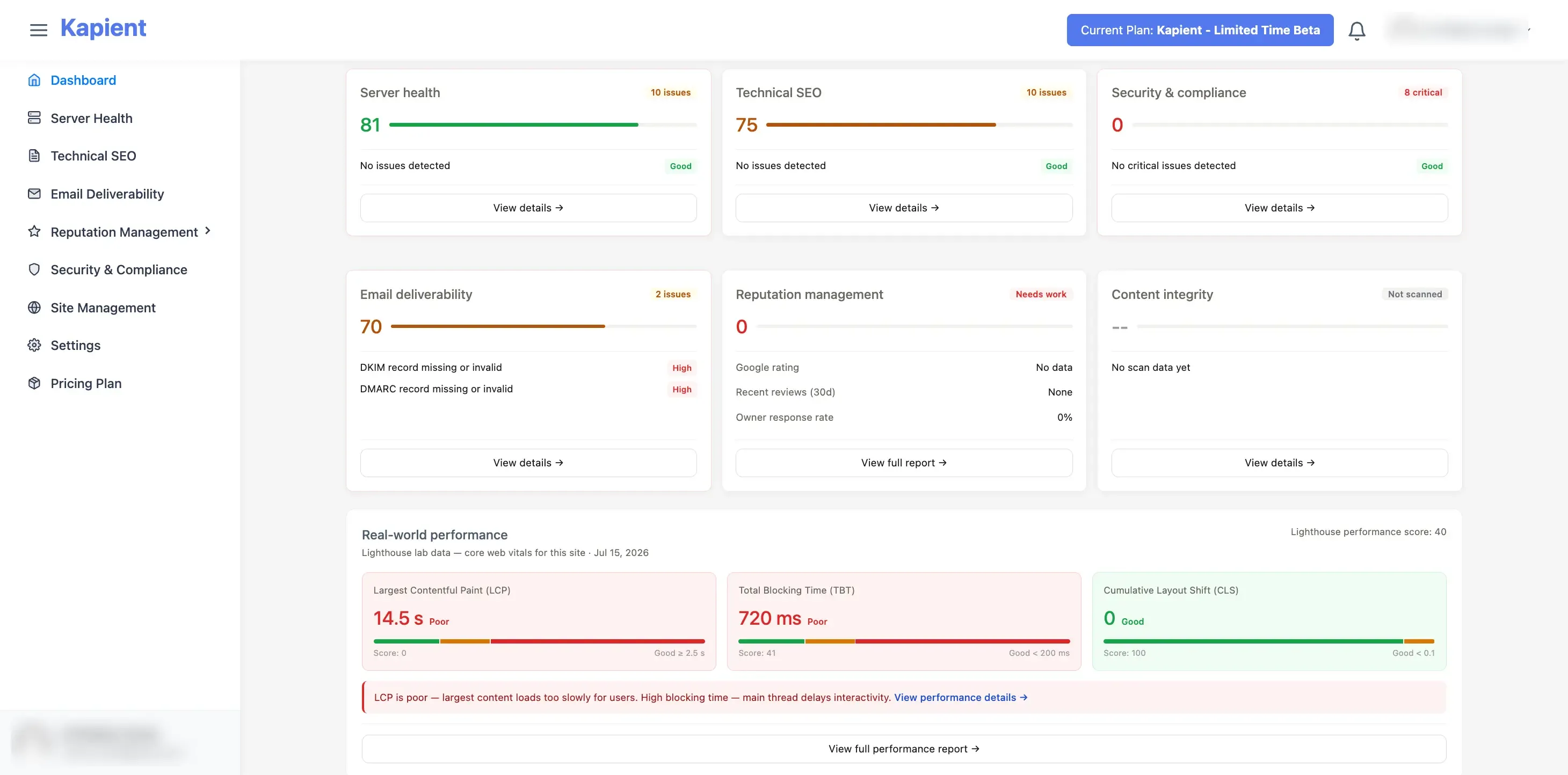
Detection is handled across platforms, not just WordPress. Most multi-site tools built for freelancers only manage WordPress, which breaks the moment one client is on Wix or Squarespace and you are back to manual checks for part of your book. Scanning that works regardless of platform keeps the whole portfolio on one system.
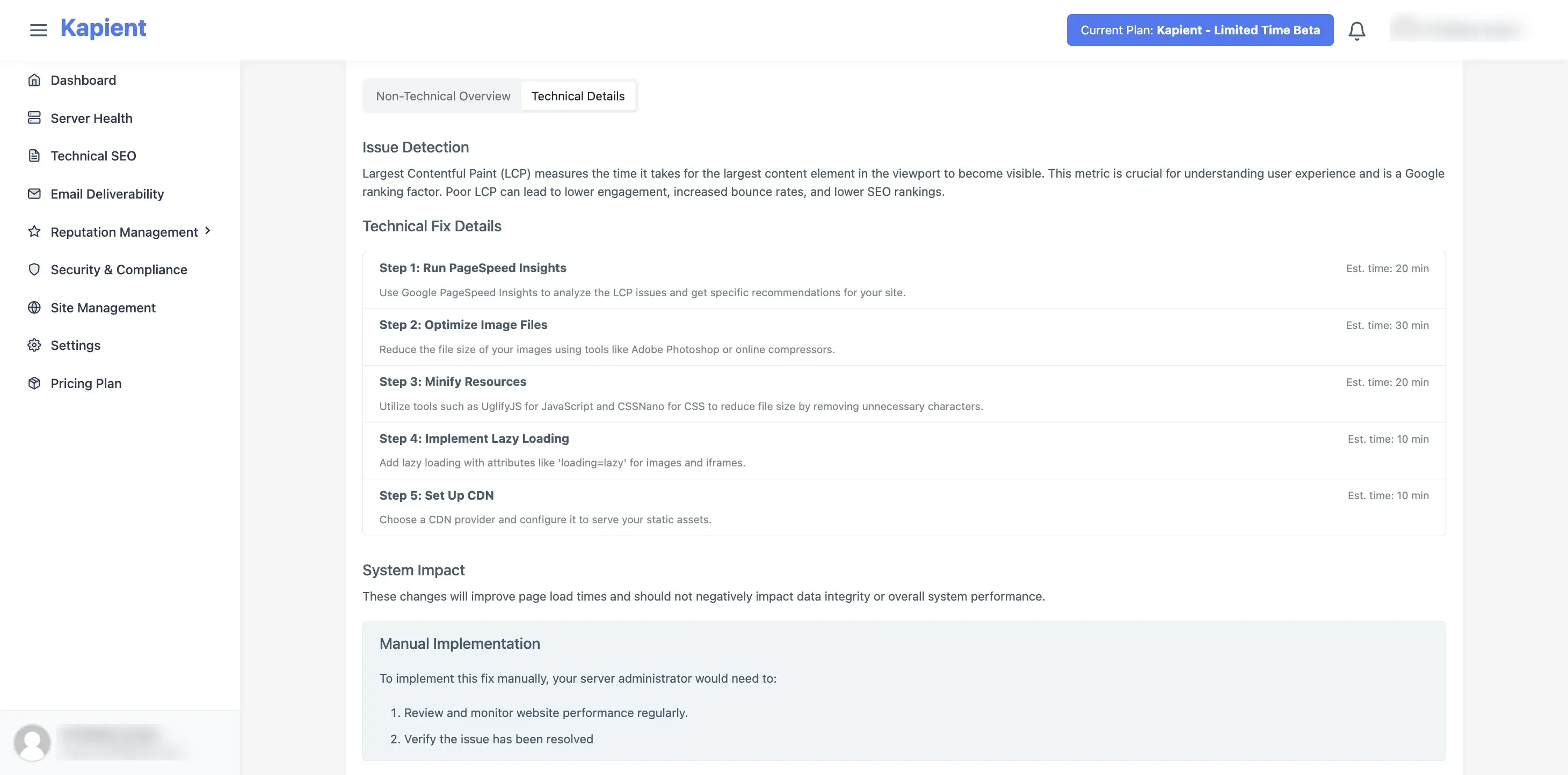
Turn alerts into action. Instead of receiving a cryptic alert that requires investigation, get plain-English fix instructions tailored to your site's actual setup. Go from "something broke" to "it's fixed" without the research detour.
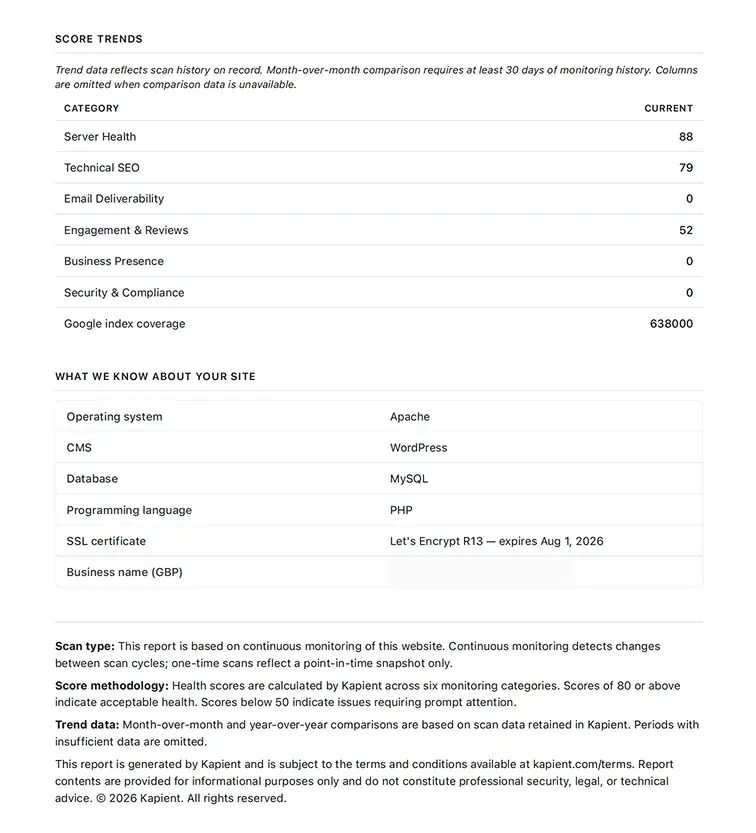
Client-ready report The scan history for each site rolls up into a client-ready report automatically, which removes the single largest per-site time cost that has nothing to do with actual work.
Stack those three and the per-site overhead drops far enough that the arithmetic changes completely. Twenty hours a month of looking becomes two hours a month of acting.
So what number should you aim for?
A practical progression:
- 1 to 10 sites: Manual is fine. Do not over-engineer. Learn what breaks and why.
- 10 to 20 sites: The pinch point. Automate detection and reporting now, before you are forced to. Freelancers who wait until it hurts usually drop quality first and notice second.
- 20 to 50 sites: Using automated monitoring like Kapient is mandatory. Your job is now triage and fixing, not checking. Tiered care plans matter here, because not every site should get the same attention.
- 50 to 100+ sites: Achievable solo with strong automation and disciplined tiering. Beyond this, you are not scaling a freelance practice anymore, you are building an agency and should hire.
The freelancers who plateau at 15 sites and the ones running 60 are rarely separated by talent. They are separated by whether a machine or a human is doing the looking.
Manage more client sites without adding more hours
Kapient watches every client site continuously across dozens of technical and quality factors, on WordPress, Wix, Squarespace, or anything else, and tells you exactly what broke and how to fix it in plain English. Stop spending your month confirming that nothing is wrong.
See every client site issues in one dashboard with Kapient and move your ceiling.
Frequently asked questions
How many websites can one person manage?
Doing all checks manually, roughly 15 to 25 sites before quality suffers, since each site takes about 1 to 2 hours per month. With monitoring and client reporting automated, a single freelancer can realistically manage 50 to 100 sites, because time is only spent on sites with genuine problems rather than on routine inspection.
How long does it take to maintain one website per month?
For a standard brochure site, about 1 to 2 hours per month covering updates, backups, form and link testing, SSL and speed checks, reporting, and client communication. Care plans in the industry commonly bundle 2 to 5 hours per site per month, with e-commerce and plugin-heavy sites requiring considerably more.
How many client websites is too many?
You are past your limit when checks start getting skipped, when clients discover problems before you do, or when maintenance leaves no room for project work. These are symptoms of a time ceiling, not a skill ceiling, and they signal that detection and reporting need to be automated rather than that you need fewer clients.
Can a freelancer manage 50 websites alone?
Yes, but not manually. At 50 sites, manual checking would consume 50 to 100 hours per month, which is not viable alongside any other work. It becomes achievable when monitoring runs continuously and automatically, reports generate themselves, and the freelancer's time goes only into fixing issues that are actually flagged.
What is the hardest part of managing multiple client websites?
The volume of routine checking, most of which finds nothing wrong. The majority of manual inspections confirm the site is fine, which produces no value but consumes the bulk of the hours. Compounding this, the most damaging failures are silent, so manual checks often miss them anyway.
Do I need different tools for WordPress, Wix, and Squarespace clients?
Ideally not. Many popular multi-site management tools only work with WordPress, which forces manual checks for any client on another platform and fragments your workflow. Platform-agnostic monitoring keeps every client site on one system regardless of what it was built with.
Written by
Khul Anwar
Growth
Khulanwar leads content and growth at Kapient, where the team helps small businesses and agencies keep their websites healthy, fast, and compliant. He writes about website monitoring, technical SEO, and the maintenance work that quietly keeps sites from breaking after launch.
Related articles

Website Accessibility for Agencies: Turning Compliance Into a Service
September 16, 2026

Recurring Revenue for a Web Agency: The Playbook for Predictable, Scalable Growth
September 7, 2026

10 Common WCAG Failures and How to Fix Them
September 22, 2026
10 Best UptimeRobot Alternatives for 2026
September 10, 2026