Accessibility Audit
What Is an Accessibility Audit?
TL;DR: An accessibility audit is a formal, point-in-time evaluation of a website against accessibility standards like WCAG, carried out to find and document the barriers that stop people with disabilities from using it. A thorough audit combines automated scanning with manual expert testing, including keyboard and screen reader checks, and produces a report listing each issue, the WCAG criterion it fails, and how to fix it. Professional audits typically cost from around 1,500 dollars for small sites into the tens of thousands for large ones. Because a site changes constantly, an audit is a snapshot that needs monitoring to stay current.
An accessibility audit is a structured health check that tells you, in detail, how accessible your website actually is. It measures your site against the Web Content Accessibility Guidelines (WCAG) and delivers a report of exactly what is failing, where, and why, so your team knows what to fix. It is the diagnostic step that comes before fixing anything.
An audit sits in the middle of the web accessibility workflow. You audit to find the problems, you fix them through accessibility remediation, and you keep the site accessible over time through monitoring. The audit is where you get an honest, expert picture of where you stand.
What is an accessibility audit?
An accessibility audit is a formal evaluation of a digital product against a defined accessibility standard, resulting in a documented list of issues and how to resolve them. The standard is almost always WCAG, usually Level AA, and the output is a report that maps each barrier to the specific success criterion it violates.
What separates an audit from a quick scan is depth and formality. A browser scanner gives you a rough automated result in seconds. An audit is a deliberate, scoped evaluation, usually including human expert testing, that produces something you can act on, hand to developers, show to a regulator, or use as the baseline for a remediation project.
What is included in an accessibility audit?
A complete audit generally includes:
- A defined scope, meaning the specific pages, templates, and user flows being evaluated. Auditors usually assess a representative sample rather than every page.
- Automated testing to catch the machine-detectable issues quickly.
- Manual expert testing, where specialists check the site against WCAG by hand, including keyboard-only navigation and screen reader testing.
- A findings report, listing each issue, the WCAG criterion it fails, its severity, where it occurs, and guidance on how to fix it.
- A conformance summary, sometimes formalized as a VPAT or accessibility conformance report, stating how close the site is to a given WCAG level.
The report is the real deliverable. A good one is prioritized by severity so your team knows what to fix first.
Types of accessibility audit
Audits vary in depth, and the depth drives both the coverage and the cost.
| Approach | What it involves | Coverage | Typical cost |
|---|---|---|---|
| Automated scan | Software checks pages against WCAG rules | Around 25 to 40 percent of issues | Free to low |
| Expert manual audit | Specialists test with keyboard and screen readers against WCAG and write a report | Most issues, including judgment calls | Roughly 1,500 to 25,000+ dollars by scope |
| Full audit with user testing | Adds task testing by people with disabilities | Highest real-world assurance | Higher, project based |
Automated-only "audits" are really just scans. They are useful as a first pass, but because automation catches only a portion of WCAG issues, a scan alone cannot tell you whether your site is truly accessible. Real compliance work relies on the manual layer.
How much does an accessibility audit cost?
Cost is driven mainly by scope and complexity, meaning the number of unique page templates and interactive flows, not just the page count. As a rough guide based on current market pricing:
| Site size | Typical professional audit cost |
|---|---|
| Small business (a handful of key templates) | Around 1,500 to 5,500 dollars |
| Mid-size site (more templates, interactive flows) | Around 7,000 to 25,000 dollars |
| Large enterprise platform | 25,000 dollars and up |
Automated scans cost far less, often free to a few hundred dollars, but they only cover the machine-detectable slice. And remember that the audit only identifies issues. Fixing them is a separate cost, so budget for remediation as well as the audit itself.
Audit versus testing versus monitoring
These terms overlap, so it helps to separate them. Accessibility testing is the broad activity of checking for issues, which can be quick or thorough, one-off or repeated. An audit is a formal, in-depth, point-in-time instance of that testing, producing a documented report. Monitoring is testing made continuous and automatic, running in the background between audits. You might audit once or twice a year and monitor every day.
Why an accessibility audit is only a snapshot
Here is the limitation built into the word "audit." It is a point-in-time evaluation. It tells you how accessible your site was on the day it was done, and no later. The instant the audit ends, your site keeps changing, and every new page, image, or design update is a chance to introduce a barrier the audit never saw.
That is the shelf-life problem, and it hits audits hard because they are expensive and infrequent. A site can pass a thorough audit in the spring and accumulate dozens of new issues by autumn, so that the next audit becomes a costly cleanup of months of unnoticed drift. An audit is essential for the deep, human-tested baseline it provides, but on its own it cannot keep a site accessible between reviews.
How Kapient complements your accessibility audit
This is where continuous monitoring fills the gap an audit leaves. Kapient checks your live site against WCAG on an ongoing basis, so the machine-detectable barriers that appear after your audit are caught as they happen, rather than piling up until the next one.
The two work together. An expert audit gives you the deep, human-tested baseline, including the judgment-based issues only a person can catch. Kapient then keeps watch between audits, monitoring for regressions like images published without alt text, contrast that drops after a redesign, and broken keyboard navigation. When it finds an issue, it sends you an email alert.
To be clear about scope, Kapient does not replace a full accessibility audit. Automated monitoring covers the part of WCAG that software can test, not the manual, assistive technology, and user testing that a proper audit includes. What it does is make sure the ground you gained in the audit does not quietly erode before your next one, so each audit builds on the last instead of starting over. This is the ongoing layer of web accessibility monitoring that keeps an audit's value from expiring.
An audit tells you where you stand today. It says nothing about next month. Kapient monitors your live site against WCAG continuously, so the barriers that appear between audits are caught early. Start monitoring your site with Kapient and protect the investment your audit represents.
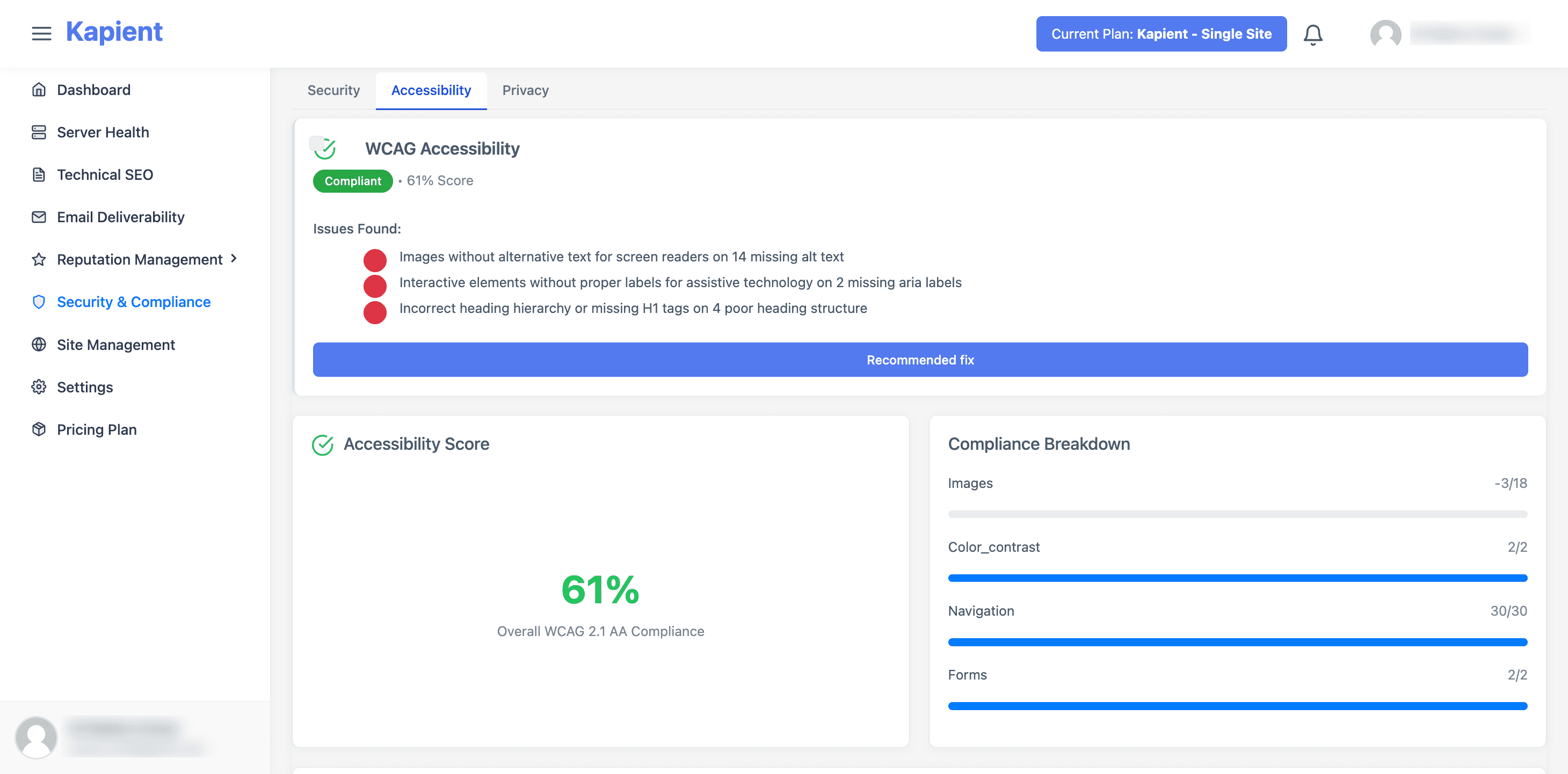
Kapient keeps watch between audits, catching new WCAG issues before they accumulate into the next cleanup.
Frequently asked questions
What is an accessibility audit? An accessibility audit is a formal, point-in-time evaluation of a website against accessibility standards like WCAG, done to find and document the barriers that prevent people with disabilities from using it. A thorough audit pairs automated scanning with manual expert testing and produces a report listing each issue, the WCAG criterion it fails, and how to fix it.
What is included in an accessibility audit? A complete audit includes a defined scope of pages and flows, automated testing, manual expert testing including keyboard and screen reader checks, and a findings report that maps each issue to a WCAG criterion with severity and fix guidance. Many audits also provide a conformance summary or VPAT stating how close the site is to a given WCAG level.
How much does an accessibility audit cost? Professional audits typically run from around 1,500 to 5,500 dollars for a small business site, 7,000 to 25,000 dollars for a mid-size site, and 25,000 dollars or more for large enterprise platforms. Cost is driven mainly by the number of unique templates and interactive flows in scope. Automated-only scans cost far less but cover only part of WCAG, and fixing the issues found is a separate expense.
How long does an accessibility audit take? It depends on scope. A small site audit can take a few days, while a large or complex site with many templates and interactive flows can take several weeks. Adding user testing or multiple browsers and screen readers extends the timeline. The report and its remediation guidance usually follow shortly after the testing is complete.
What is the difference between an accessibility audit and accessibility testing? Accessibility testing is the broad activity of checking a site for issues, which can be quick or thorough and done once or repeatedly. An audit is a formal, in-depth, point-in-time instance of that testing that produces a documented report. Monitoring is a third thing again: continuous, automatic testing that runs between audits to catch new issues as they appear.
How often should you run an accessibility audit? A full audit once or twice a year is a common baseline, and you should also audit after any major redesign or platform change. Because sites change constantly between audits, the most reliable approach pairs periodic audits with continuous monitoring, so new issues are caught as they appear rather than accumulating until the next scheduled review.
Related terms
- Alt Text - one of the most common issues an audit flags: images with no text description.
- Color Contrast - another frequent finding: text that fails WCAG contrast ratios.
- Screen Reader - the assistive technology auditors use during manual testing.
- Accessibility Statement - the public conformance summary an audit often supports.
Written by the Kapient team. Last updated: September 12, 2026.