Web Accessibility
TL;DR: Web accessibility means designing and building websites so that everyone can use them, including people with disabilities. In simple words, it is making sure a person who cannot see, hear, use a mouse, or process information the way most people do can still perceive, navigate, and interact with your site. It is measured against the Web Content Accessibility Guidelines (WCAG), the international standard for accessible content. This guide explains what web accessibility is, why it matters, what it looks like in practice, and how to keep a site accessible as it changes.
What is web accessibility?
Web accessibility is the inclusive practice of ensuring websites, tools, and technologies are designed and built so that people with disabilities can use them. It covers the full range of disabilities that affect access to the web, including visual, auditory, motor, and cognitive disabilities.
The scale is larger than many people expect. The World Health Organization estimates that 1.3 billion people, around 16 percent of the world's population, live with a significant disability. For all of them, the difference between an accessible site and an inaccessible one is the difference between using a service independently and being locked out of it. Accessibility is what makes the web usable for that audience rather than optional for them.
Why web accessibility matters
There are three reasons accessibility has moved from a nice-to-have to a requirement.
It is the right thing to do, and it reaches more people. An inaccessible site excludes a large group of potential visitors, customers, and users. An accessible one includes them. Many accessibility improvements also help people without disabilities, the way captions help someone watching a video in a noisy room, an effect often called the curb-cut effect.
It is increasingly required by law. Around the world, accessibility is written into legislation, from the ADA in the United States to the European Accessibility Act in the EU. These laws generally point to WCAG as the standard to meet, so accessibility is now a legal expectation for a large share of organizations.
It overlaps with quality and SEO. Many of the things that make a site accessible, like clear structure, descriptive text, and fast, predictable navigation, also make it easier for search engines to understand and for everyone to use. Accessible sites tend to be better-built sites.
Examples of web accessibility
Accessibility is easiest to understand through concrete features. Each of these removes a specific barrier for a specific group, and most help everyone.
| Accessible feature | Who it helps most |
|---|---|
| Text alternatives (alt text) on images | People using screen readers |
| Captions and transcripts for media | People who are deaf or hard of hearing |
| Full keyboard operability | People who cannot use a mouse |
| Sufficient color contrast | People with low vision or color blindness |
| Clear labels and error messages on forms | People with cognitive disabilities, and everyone |
| Consistent, predictable navigation | People with cognitive and visual disabilities |
| Resizable text that does not break the layout | People with low vision |
An accessible website is simply one that does these things well across every page. There is no single "most accessible website" to copy, because accessibility is about how consistently a site removes barriers, not about a particular design.
Web accessibility standards
Web accessibility is measured against a standard so that "accessible" means something specific and testable. That standard is the Web Content Accessibility Guidelines (WCAG), published by the World Wide Web Consortium's Web Accessibility Initiative.
WCAG is built on four principles, often shortened to POUR: content must be Perceivable, Operable, Understandable, and Robust. It defines three conformance levels, A, AA, and AAA, with Level AA being the target that most laws and organizations use. Legal frameworks like the ADA, Section 508, and the European Accessibility Act sit on top of WCAG and generally treat Level AA conformance as the benchmark. So while accessibility is the goal, WCAG is how you measure whether you have reached it.
How web accessibility is achieved and maintained
Making a site accessible happens in a cycle. You build with accessibility in mind, you test the site against WCAG through accessibility testing, and you fix the barriers you find through accessibility remediation. That gets a site accessible at a point in time.
Keeping it accessible is the harder part, because a website never stops changing.
Why web accessibility is not a one-time project
Here is the part that catches organizations out. Accessibility is not a state you reach once and keep forever. A website changes constantly, and every new blog post, product page, plugin update, or redesign is a chance to reintroduce a barrier. A new image ships without alt text. A redesigned button loses its keyboard focus. A template update drops the contrast below the readable threshold.
That is the shelf-life problem. The accessibility work you completed in the spring can quietly unravel by summer, with no warning, because nothing is watching for the change. A site that was accessible on launch day is only still accessible if someone, or something, keeps checking. This is why accessibility has shifted from a one-time audit toward ongoing web accessibility monitoring.
How Kapient helps you keep your site accessible
This is where continuous monitoring replaces the one-time check. Kapient checks your live website against WCAG on an ongoing basis, so the accessibility barriers that reappear as your content changes are surfaced as they happen rather than at your next review.
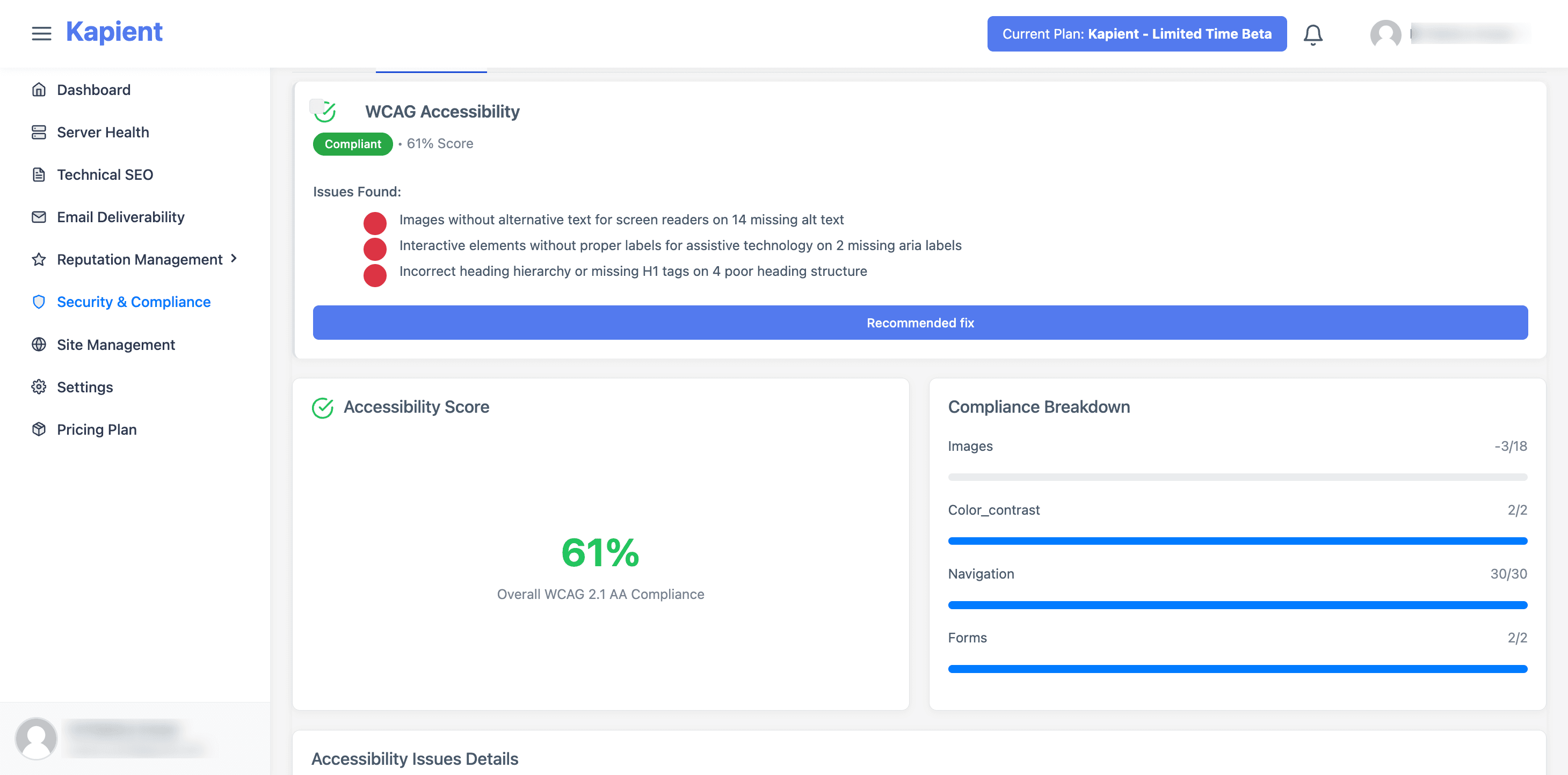
Kapient watches the live-site factors most likely to break with everyday edits: images missing meaningful alt text, color contrast that drops below WCAG thresholds, keyboard and navigation issues, and forms with missing labels. When it finds an issue, it sends an email alert so you know something needs attention, and inside the dashboard it gives you a "Recommended fix" button with plain-English, step-by-step guidance tailored to your platform, whether you build on WordPress, Wix, Squarespace, Shopify, or Webflow.
One honest boundary. Automated monitoring catches the portion of accessibility that software can test, so Kapient does not replace the manual, assistive technology, and user testing that full WCAG conformance requires. What it does is make sure the automatable checks never lapse between human reviews, so a new barrier is caught in days rather than months. It also covers your live website, not the interiors of downloadable documents.
Accessibility is not a launch-day task. It is an every-day one. Kapient monitors your live site against WCAG around the clock and hands you the exact fix the moment a barrier appears. Start monitoring your site with Kapient and keep your accessibility from quietly slipping.
Frequently asked questions
What is accessibility in simple words? Web accessibility means building a website so everyone can use it, including people with disabilities. In practice, that means someone who cannot see, hear, use a mouse, or easily process information can still read your content, use your navigation, and complete tasks like filling in a form. If a person can do everything on your site regardless of how they access it, your site is accessible.
What are examples of web accessibility? Common examples include alt text on images so screen readers can describe them, captions and transcripts for video and audio, full keyboard operability for people who cannot use a mouse, sufficient color contrast for people with low vision, and clear labels on forms. Each removes a specific barrier, and most of them also make the site easier for everyone to use.
What is the difference between WCAG and ADA? WCAG is the technical standard that defines what an accessible website looks like, published by the W3C. The ADA is a US civil rights law that prohibits discrimination against people with disabilities. The ADA does not spell out technical web requirements itself, so courts generally treat WCAG conformance, usually at Level AA, as the practical measure of whether a site meets its obligations.
What is WCAG for websites? WCAG, the Web Content Accessibility Guidelines, is the international standard that defines how to make website content accessible. It organizes requirements under four principles (Perceivable, Operable, Understandable, Robust) and three conformance levels (A, AA, AAA). For most websites, WCAG 2.2 Level AA is the target, and it is the benchmark most accessibility laws reference.
What are web accessibility standards? The primary web accessibility standard is WCAG, maintained by the W3C, which nearly all other frameworks build on. On top of it sit legal standards like Section 508 in the United States, the EN 301 549 standard in Europe, and various national laws. In almost every case, meeting WCAG Level AA is what these standards require in practice.
How do you make a website accessible? Start by building or auditing your site against WCAG to find barriers, then fix them: add alt text, ensure keyboard access, correct color contrast, label forms clearly, and use proper heading structure. Test with automated tools plus manual and screen reader checks, since automation cannot catch everything. Finally, monitor the site continuously, because new content and updates can reintroduce barriers at any time.
Written by the Kapient team. Last updated: September 10, 2026.