Web Accessibility Monitoring: The Complete Guide
Web accessibility monitoring is how you keep a website usable for people with disabilities not just on launch day, but every day after. It is the continuous checking of your live site against the [Web Content Accessibility Guidelines

Khul Anwar
Growth

Web Accessibility Monitoring: The Complete Guide
TL;DR: Web accessibility monitoring is the ongoing process of automatically checking a website against accessibility standards like WCAG, so barriers that appear as your site changes are caught quickly instead of building up unnoticed. It pairs automated scanning, which is fast but catches only part of the picture, with periodic human testing for full coverage. Free tools like WAVE and Lighthouse are great for one-off checks, but they do not watch your site over time. This guide explains what monitoring covers, the tools involved, and how continuous monitoring keeps your site accessible as it evolves.
Web accessibility monitoring is how you keep a website usable for people with disabilities not just on launch day, but every day after. It is the continuous checking of your live site against the Web Content Accessibility Guidelines (WCAG), the standard that defines accessible web content, so that new barriers are flagged as soon as they appear. It is one important layer of broader website monitoring, focused specifically on whether everyone can actually use your site.
The reason this has become its own discipline is a single stubborn fact: websites change daily. Content updates, new plugins, and design tweaks can each break accessibility by accident, and none of them warn you when they do. A site that was fully accessible last month can be failing today, which is why a one-time check is never enough.
What is web accessibility monitoring?
Web accessibility monitoring is the practice of repeatedly and automatically evaluating a website against accessibility standards, then alerting you when new issues are found. The goal is early detection: catch a missing alt text or a broken contrast ratio within days of it appearing, rather than months later in an audit or, worse, in a legal complaint.
It helps to place monitoring next to two related terms. An accessibility audit is a formal, point-in-time evaluation, often for compliance. Accessibility testing is the act of checking for issues, whether once or repeatedly. Monitoring is testing made continuous and automatic, so it keeps running in the background instead of being something a person has to remember to do. Monitoring finds the problems as they arise. Fixing them is accessibility remediation, the step that follows.
Why continuous accessibility monitoring matters
Three things make ongoing monitoring worth it, rather than a single annual check.
Websites change constantly. Every new blog post, product page, plugin update, or redesign is a chance to introduce a WCAG failure. A new image ships without alt text. A redesigned button loses its focus state. A template update drops the contrast below the threshold. These changes are routine, and each one can quietly undo previous accessibility work.
Catching issues early is far cheaper. A single barrier caught the week it appears is a five-minute fix. The same barrier left for a year becomes part of a large remediation project, or the basis of a legal claim. Monitoring keeps small problems small.
Accessibility is increasingly a legal requirement. Accessibility law now expects ongoing conformance, not a one-time effort. In the European Union, the Web Accessibility Directive requires member states to actively monitor public sector websites and report on them periodically, and the European Accessibility Act extends similar expectations to the private sector. In the United States, WCAG conformance is the practical benchmark courts apply. In every case, the standard is a site that stays accessible, which only monitoring can demonstrate.
There is one honest nuance the best monitoring programs accept: automated scans and manual testing each catch what the other misses. Automated monitoring is fast and continuous but sees only part of the picture. Human testing, including keyboard and screen reader checks, covers the rest. A complete strategy uses both.
What web accessibility monitoring checks
Monitoring focuses on the machine-detectable WCAG issues that change most often as a site is edited:
- Images missing meaningful alt text
- Color contrast that falls below WCAG thresholds after a design change
- Keyboard and navigation problems that block people who do not use a mouse
- Forms with missing or unclear labels
- Structure, such as heading order and semantic markup that assistive technology relies on
These are the areas where everyday content changes most often introduce new barriers, which is exactly why they benefit from continuous watching rather than occasional review.
Web accessibility monitoring tools
The related searches for this topic are full of tools, checkers, and evaluation tools, so it is worth being clear about what each type does and where it falls short.
| Tool | Type | Cost | Best for |
|---|---|---|---|
| WAVE (by WebAIM) | Point-in-time scanner | Free | Visual, page-by-page spot checks with issues flagged on the page |
| Lighthouse | Point-in-time audit (in Chrome) | Free | A quick accessibility score alongside performance and SEO |
| axe DevTools | Browser extension | Free tier | Developers testing specific pages during a build |
| Continuous monitoring platform like Kapient | Ongoing, whole-site | Paid | Watching an entire live site over time and alerting on new issues |
The free scanners are genuinely useful, and if you just want to check a page right now, start with WAVE or Lighthouse. The W3C also maintains a full list of evaluation tools. But notice what every free checker has in common: it evaluates one page, at one moment, when you remember to run it. That is a snapshot, not monitoring. The gap between a point-in-time checker and true accessibility monitoring is the whole reason the next section exists.
Why one-time checks quietly fall behind
Here is the trap. A point-in-time accessibility check, however good the tool, is a snapshot of a single moment. The instant you finish scanning, your site can change, and your scan is out of date. The page you checked and fixed on Monday tells you nothing about the image published without alt text on Wednesday or the contrast lost in Friday's redesign.
That is the shelf-life problem, and accessibility suffers from it more than almost any other area, because accessibility barriers are so easy to reintroduce with ordinary edits. A free checker will happily tell you a page is clean today. It will not tell you when that changes. Staying accessible depends on catching new barriers the moment they appear, which is a job only continuous monitoring can do.
How Kapient handles web accessibility monitoring
This is where a point-in-time scan becomes an ongoing safeguard. Kapient continuously checks your live website against WCAG, so the machine-detectable barriers that reappear as your content changes are surfaced as they happen, not at your next manual review.
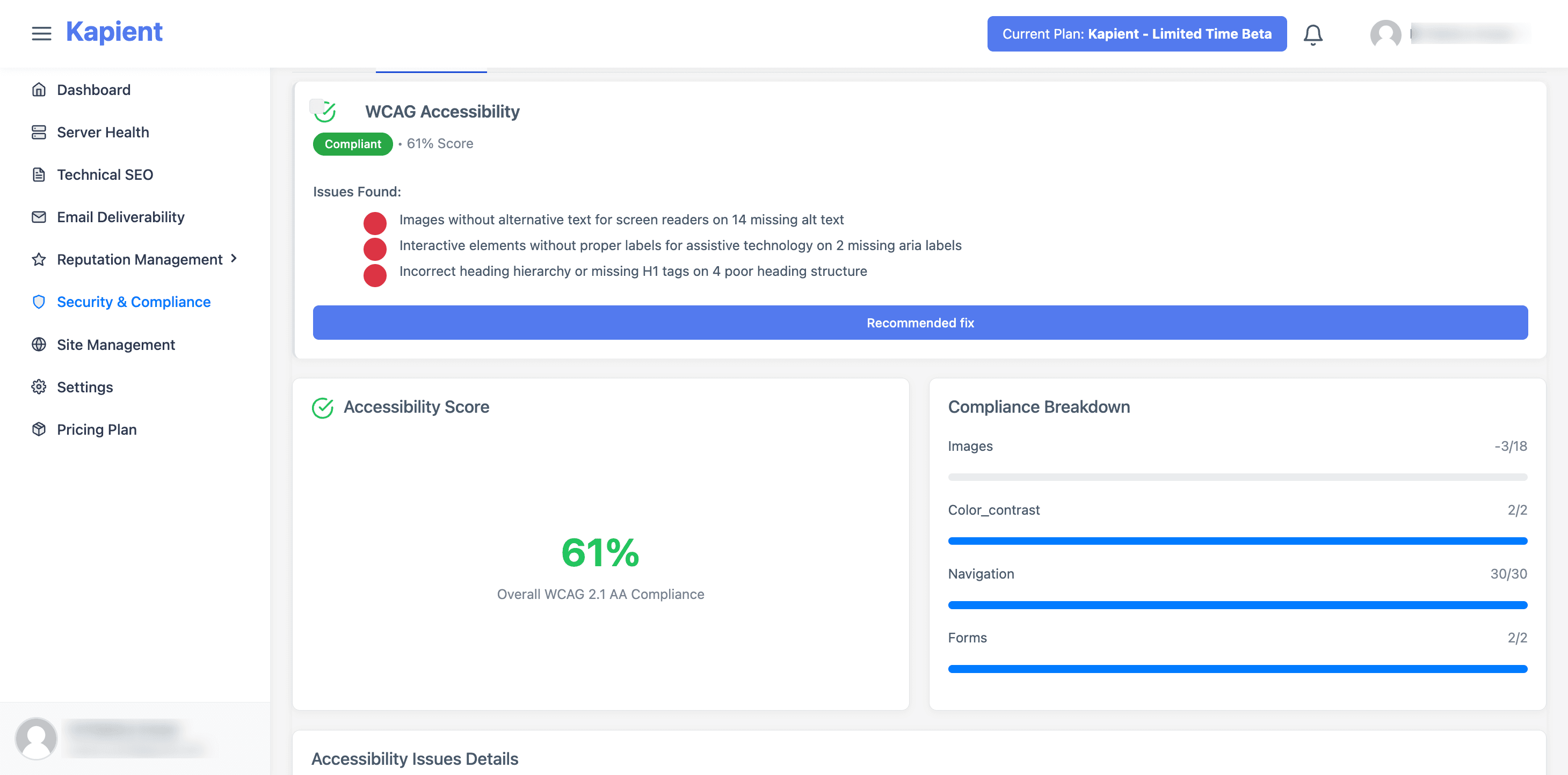
Kapient watches the live-site accessibility factors most likely to break with everyday edits: images missing meaningful alt text, color contrast that drops below WCAG thresholds, keyboard and navigation issues, and forms with missing labels. When it detects an issue, it sends an email alert so you know something needs attention, and inside the dashboard it gives you a "Recommended fix" button that reveals plain-English, step-by-step guidance tailored to your platform. The alert tells you what changed. The dashboard tells you exactly how to fix it, which is the difference between a list of problems and problems actually solved.
One honest boundary. Automated monitoring catches the portion of WCAG that software can test, so Kapient does not replace the manual, assistive technology, and user testing that full conformance requires. What it does is make sure the automatable checks never lapse between human reviews, so a new barrier is caught in days rather than discovered in a complaint. It also covers your live website, not the interiors of downloadable documents, which fall under document remediation. Used alongside periodic human testing, it is what keeps your accessibility from silently regressing.
For agencies, this doubles as a client-communication asset: plain-English accessibility reporting is something you can put in front of a client, and it fits naturally into a website care plan.
Your site was accessible when you last checked. Is it accessible right now? Kapient monitors your live pages against WCAG around the clock and hands you the exact fix the moment a barrier appears. Start monitoring your site with Kapient so accessibility never quietly slips.
Frequently asked questions
What is web accessibility monitoring? Web accessibility monitoring is the ongoing, automated process of checking a website against accessibility standards like WCAG and alerting you when new barriers appear. Unlike a one-time audit or scan, it runs continuously, so issues introduced by everyday content and design changes are caught quickly rather than accumulating unnoticed.
How is accessibility monitoring different from accessibility testing? Testing is the act of checking a site for accessibility issues, which can be done once. Monitoring is that testing made continuous and automatic, so it keeps running in the background. A single test tells you about your site today. Monitoring keeps telling you as your site changes, which is essential because new barriers appear with routine updates.
What tools are used for web accessibility monitoring? Free point-in-time tools like WAVE, Lighthouse, and axe are excellent for checking a single page on demand. For ongoing coverage, continuous monitoring platforms scan your whole live site on a schedule and alert you when something changes. The W3C maintains a comprehensive list of evaluation tools, and most complete programs combine automated monitoring with periodic manual testing.
Is there a free website accessibility checker? Yes. WAVE by WebAIM and Lighthouse, built into Chrome, are both free and genuinely useful for checking a page at a point in time. Their limitation is that they only evaluate one page when you run them, so they cannot watch your site over time or alert you to new issues. That continuous coverage is what dedicated monitoring adds.
Does accessibility monitoring make my website WCAG compliant? Monitoring is a major part of staying compliant, but automated monitoring alone does not guarantee full WCAG conformance, because software can only test part of the guidelines. It reliably catches machine-detectable issues as they appear, which prevents most regressions. Full conformance also requires manual, assistive technology, and user testing for the criteria that need human judgment.
How often should you monitor a website for accessibility? Continuously. Because accessibility barriers are so easily reintroduced by ordinary content and design changes, any gap between periodic checks is a window in which an issue can go unnoticed. Automated monitoring runs around the clock and alerts you only when something changes, which is both more reliable and less work than scheduled manual scans.
Written by
Khul Anwar
Growth
Khulanwar leads content and growth at Kapient, where the team helps small businesses and agencies keep their websites healthy, fast, and compliant. He writes about website monitoring, technical SEO, and the maintenance work that quietly keeps sites from breaking after launch.
Related articles
10 Common WCAG Failures and How to Fix Them
September 22, 2026
How to Check if Your Website Meets WCAG Accessibility Standards
September 10, 2026
WordPress Accessibility: How to Make Your Site WCAG Compliant
September 10, 2026
Website Accessibility for Agencies: Turning Compliance Into a Service
September 16, 2026