What to Include in a Website Care Plan: The Complete Checklist
The fix is to think in areas rather than tasks: there are six things a maintained website needs watched, every plan should touch all six, and the tiers differ in how deep each one goes. This checklist walks through all six, what belongs in each, and how to divide them across tiers without giving away the work that costs you money.

Khul Anwar
Growth

What to Include in a Website Care Plan: The Complete Checklist
TL;DR: A website care plan should cover six areas: updates and backups, security, uptime and SSL monitoring, performance and SEO health, functionality checks like forms and links, and a monthly client report. Split them across tiers by depth, not by leaving whole areas out, so every client gets the essentials and higher tiers get faster response, broader monitoring, and included edit hours. The report is not an afterthought. It is the deliverable that makes an invisible service feel worth paying for, and it is what most cancellations come down to when it is missing.
Deciding what goes into a care plan is where most designers either overload the entry tier until it is unprofitable, or thin it out until it is indistinguishable from cheap hosting. The fix is to think in areas rather than tasks: there are six things a maintained website needs watched, every plan should touch all six, and the tiers differ in how deep each one goes. This checklist walks through all six, what belongs in each, and how to divide them across tiers without giving away the work that costs you money.
The Six Areas Every Care Plan Covers
Before the tier breakdown, here is the whole checklist in one place. Everything below is an expansion of this.
- Updates and backups - keeping the software current and recoverable
- Security - preventing and detecting compromise
- Uptime and SSL - making sure the site is reachable and trusted
- Performance and SEO health - keeping it fast and findable
- Functionality - making sure the things that make money still work
- Reporting - proving all of the above happened
Miss one and you have a gap the client will eventually fall through. The most commonly missing area is functionality monitoring, which is also the one that costs clients the most when it fails, because a broken contact form or checkout loses revenue silently.
1. Updates and Backups
The baseline that clients assume is happening whether or not they pay for it.
Include:
- Core platform, theme, and plugin updates on a defined schedule
- Update verification, meaning someone confirms the site still works after updating, not just that updates were applied
- Regular automated backups, stored off the server so a compromised server does not take the backups with it
- Periodic restore testing, because a backup nobody has ever restored is a hope, not a backup
Tier it by frequency. Monthly updates on the entry tier, weekly in the middle, and near-continuous with priority handling of critical security patches at the top. The verification step is what separates a real service from an automated plugin, so never drop it, even on the entry tier.
2. Security
The area where the gap between "we run a plugin" and "someone is actually watching" is widest.
Include:
- A security plugin or firewall configured and kept current
- Malware scanning
- Login hardening: strong credentials, limited attempts, two-factor where possible
- Monitoring for file changes and unexpected admin accounts, the early signs of compromise
- A defined response plan for when a site is hacked, because eventually one will be
Tier it by response, not detection. Every client deserves detection. What the higher tiers buy is how fast you act and whether emergency cleanup is included in the fee or billed separately. Unpatched vulnerabilities are the most common way small business sites get compromised, which is covered in the month-five stage of the website decay timeline.
3. Uptime and SSL
The two failures a client notices without you, because the site simply stops working.
Include:
- Uptime monitoring with alerts when the site goes down
- SSL certificate monitoring, flagging expiry before it happens rather than after
- HTTPS and redirect configuration checks, so every visitor reaches the secure version in one hop
SSL deserves specific attention because certificate lifetimes are shrinking industry-wide, from 200 days now toward 47 days by 2029, which means renewals happen more often and each one is another chance for silent automation failure. An expired certificate takes the whole site offline with a browser warning, and our guide on fixing an expired SSL certificate covers why it happens and how to prevent the repeat.
This is not a tier feature. It belongs on every tier. Uptime and SSL are the floor. A plan that does not monitor these is not a care plan.
4. Performance and SEO Health
The area that separates "keeping the site alive" from "keeping the site working well," and the natural bridge to a growth retainer later.
Include:
- Page speed and Core Web Vitals monitoring, flagging slowdowns as they appear
- Broken link detection, internal and external
- Technical SEO checks: indexing status, redirects, canonical and robots issues
- Image and asset weight, since uploaded media is the most common cause of gradual slowdown
Performance decays silently. A site that loaded in two seconds at launch is loading in five a few months later because content and plugins accumulated, and nobody noticed because the decline was gradual. Our guides to fixing slow page load time and broken links in WordPress cover the underlying fixes.
Tier it by breadth. Entry tier watches speed and uptime; middle adds broken links and SEO health; top adds compliance and reputation, below.
5. Functionality
The most overlooked area and the one with the highest cost when it fails, because functionality breaks silently and the client only finds out from a lost customer.
Include:
- Contact form delivery monitoring, confirming forms actually send rather than just showing a success message
- Checkout and payment flow checks on e-commerce sites
- Key user journeys: booking, signup, search, whatever the site exists to do
- Third-party integration health, since embedded tools and APIs break without warning
A contact form that stops delivering is the canonical silent failure. It shows the visitor a success message while the lead vanishes, so neither the client nor an occasional manual check catches it. The full diagnosis is in why a WordPress contact form stops sending emails.
This is where premium tiers earn their price. Monitoring that a checkout still works is worth a great deal to a store owner and is almost impossible to do reliably by hand.
6. Reporting
The deliverable that makes the other five visible, and the single most important thing for keeping clients.
Include:
- A regular report showing what was checked, what was caught, and what was fixed
- Plain-language summaries, not raw logs a non-technical client cannot read
- A record over time, so the client sees the site being actively cared for rather than a one-off snapshot
Here is why this matters more than it looks: clients do not cancel care plans because of price. They cancel because nothing appears to happen. Month after month the invoice arrives and the site looks identical, so the value feels invisible. A report is what makes the invisible legible. It is not paperwork attached to the service; on many plans it is the part of the service the client actually sees, which makes it the part that renews the contract.
Tier it by frequency and depth. Quarterly on the entry tier, monthly in the middle, and monthly plus a review call at the top.
The Checklist as a Tier Table
Putting all six areas across three tiers:
| Area | Essential | Professional | Priority |
|---|---|---|---|
| Updates and backups | Monthly | Weekly | Continuous |
| Security | Detection | Detection plus faster response | Detection plus included cleanup |
| Uptime and SSL | Included | Included | Included |
| Performance and SEO | Speed and uptime | Adds links and SEO | Adds compliance and reputation |
| Functionality | Basic | Forms and key journeys | Full e-commerce and integrations |
| Reporting | Quarterly | Monthly | Monthly plus review call |
| Response time | 3 days | 1 day | Same day |
| Edit hours | None | 30 min | 2 hours |
The Problem: Six Areas, Manually, Across Every Client
Read back through the six areas and one thing becomes obvious. Doing all of this by hand, on every client site, every month, is not realistic past a handful of sites.
Each area is a set of things to log in and check, most checks find nothing wrong, and the checking is what eats your month. That is why most care plans quietly shrink to "we run updates and hope," which is the version that gets clients hacked and forms broken.
The checklist only works as a business if the watching is automated, and this is exactly what Kapient handles. It continuously scans every client site across more than 74 technical and quality factors, which map directly onto the six areas above: SSL and certificate status, redirect and HTTPS configuration, uptime, page speed and Core Web Vitals, broken links, technical SEO, form delivery, accessibility and privacy compliance, and Google Business Profile and review changes.
It runs the same way regardless of platform, so a client on Wix or Squarespace is covered by the same system as your WordPress sites.
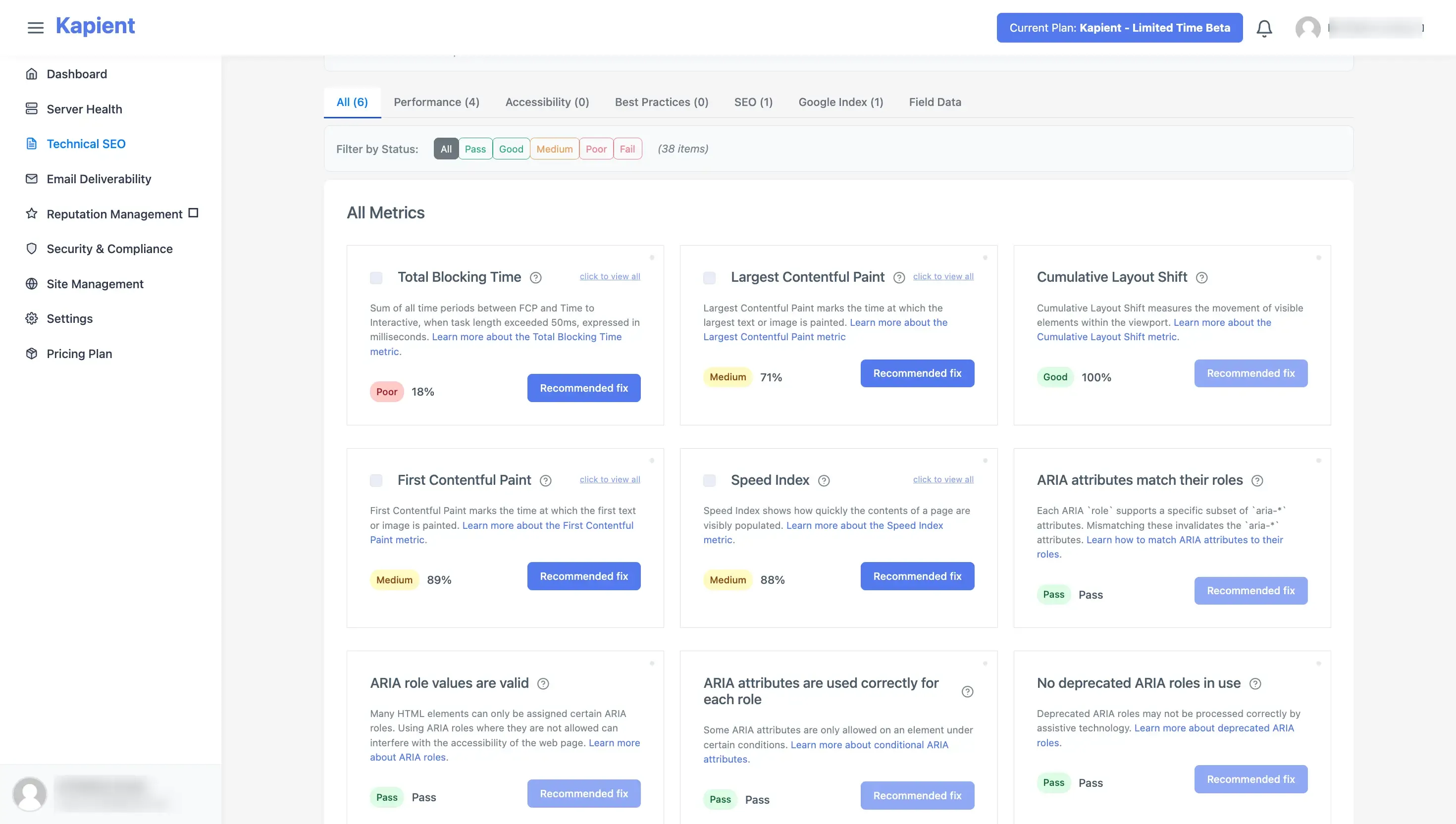
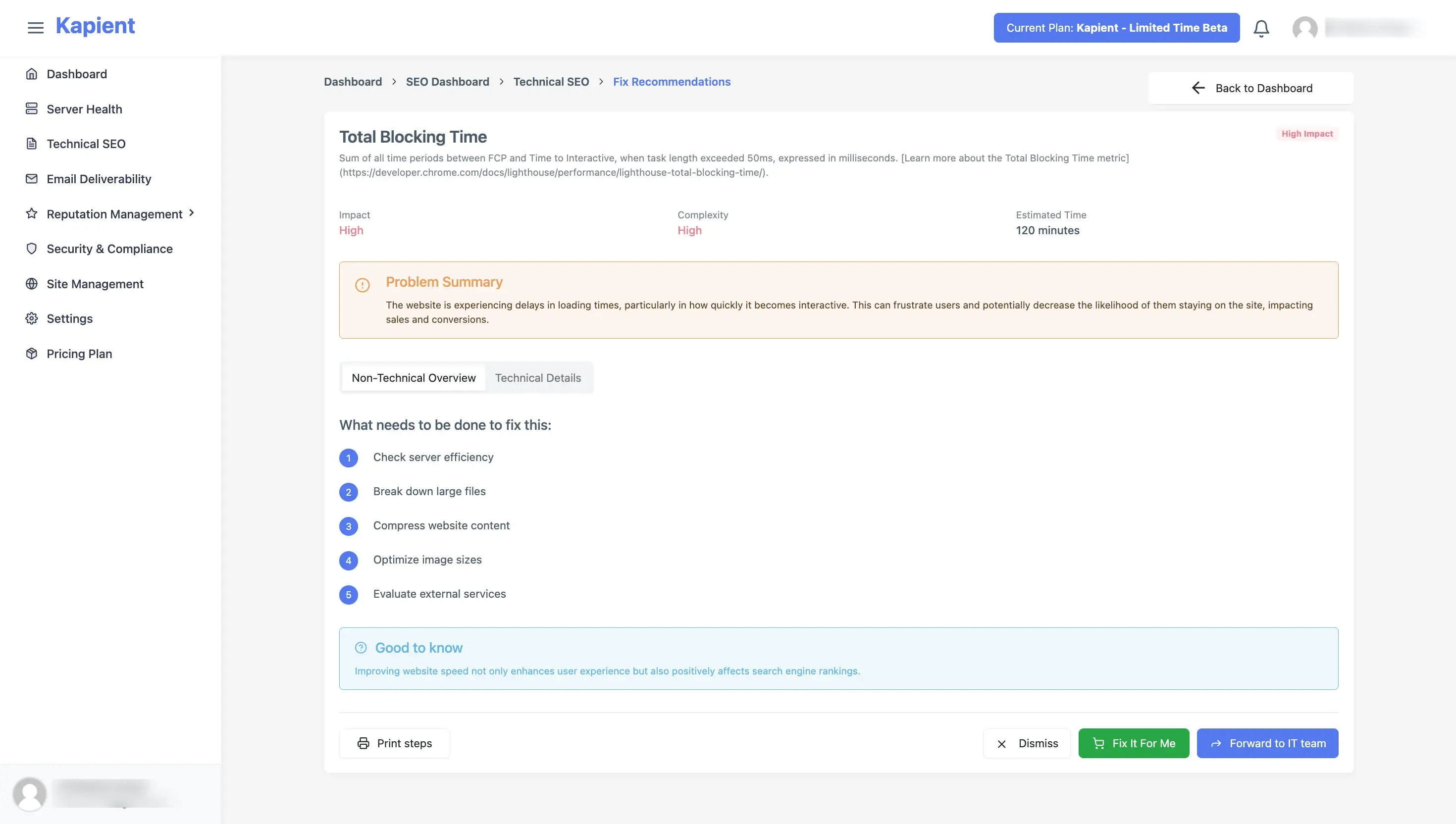
When something in any of the six areas breaks, you get an email alert. In your Kapient dashboard, the flagged issue carries a "Recommended fix" button that reveals plain-English repair steps written for that site's actual stack, so you go from alert to fix without a research detour.
A care plan is only as good as what it actually watches. Kapient monitors every client site across 74+ technical and quality factors covering all six areas of a complete care plan, emails you the moment something breaks, shows you exactly how to fix it, and generates the client report automatically. Start monitoring free and deliver the whole checklist without checking each site by hand.
Frequently Asked Questions
What should a website care plan include?
Six areas: updates and backups, security, uptime and SSL monitoring, performance and SEO health, functionality checks such as forms and checkouts, and a regular client report. Every tier should cover all six, with higher tiers adding depth, faster response, broader monitoring, and included edit hours rather than adding whole new areas.
What is the difference between website hosting and a care plan?
Hosting rents the server your site runs on. A care plan means someone is accountable for the site continuing to work: updates, backups, security, monitoring, fixes, and reporting. A client can have excellent hosting and still have an unmaintained site that is slowly breaking, which is the gap a care plan fills.
How many tiers should a website care plan have?
Three works best. A single price forces a yes-or-no decision, while three tiers turn the conversation into which one, and most clients choose the middle. Put the features you most want to sell in the middle tier, and separate tiers mainly by response time, monitoring breadth, and included edit hours.
What is the most overlooked part of a website care plan?
Functionality monitoring, especially contact form delivery. Forms fail silently, showing a success message while the lead vanishes, so the failure is invisible to both the client and occasional manual checks. It is also the failure with the highest direct cost, since it loses leads or sales the moment it breaks.
Do I need to include edit hours in a care plan?
Only on higher tiers, and always capped. Included edit hours turn a monitoring plan into a support contract, so leaving them off the entry tier keeps it profitable and prevents every client from buying the cheapest tier and emailing constantly. Cap the hours clearly and bill overflow separately.
Can one person deliver a full care plan checklist across many clients?
Only with automation. Manually working through all six areas on every client site each month does not scale past a handful of sites, and most of the checking finds nothing wrong. Continuous automated monitoring handles the detection and reporting, leaving the human to interpret and fix, which is what makes a full checklist deliverable at scale.
Written by
Khul Anwar
Growth
Khulanwar leads content and growth at Kapient, where the team helps small businesses and agencies keep their websites healthy, fast, and compliant. He writes about website monitoring, technical SEO, and the maintenance work that quietly keeps sites from breaking after launch.
Related articles

10 Common WCAG Failures and How to Fix Them
September 22, 2026

Website Accessibility for Agencies: Turning Compliance Into a Service
September 16, 2026
10 Best UptimeRobot Alternatives for 2026
September 10, 2026
How to Check if Your Website Meets WCAG Accessibility Standards
September 10, 2026