What Happens to a Website After Launch? The 6-Month Decay Timeline
A website starts decaying the moment it goes live. Launch is not the finish line; it is the point where a fixed, tested site meets a moving world of software updates, expiring certificates, shifting search algorithms, and link rot, and slowly falls out of sync with all of them. The decay is gradual and mostly invisible, so it goes unnoticed until a form stops sending leads, the site throws a security warning, or rankings quietly slide. Here is what actually happens, month by month, and how to catch each stage before a client does.

Khul Anwar
Growth

TL;DR: A website does not stay in the state you launched it in. Starting the day you hand it over, it begins to decay: within the first month, software updates pile up and contact form deliverability drifts; around month three, SSL certificates that fail to auto-renew take the site offline with a security warning; by month six, unpatched plugins, broken links, and stale content have quietly eroded security, lead capture, and search rankings. None of this throws an obvious error, which is why most site owners only notice when something visible finally breaks. The fix is not a bigger launch checklist. It is continuous monitoring after launch, which is exactly what a care plan is for.
A website starts decaying the moment it goes live. Launch is not the finish line; it is the point where a fixed, tested site meets a moving world of software updates, expiring certificates, shifting search algorithms, and link rot, and slowly falls out of sync with all of them. The decay is gradual and mostly invisible, so it goes unnoticed until a form stops sending leads, the site throws a security warning, or rankings quietly slide. Here is what actually happens, month by month, and how to catch each stage before a client does.
Why Websites Decay (the Part Most People Miss)
Software rot is a well-documented idea in engineering: code that is never touched still degrades, because the environment around it keeps changing. A website is the clearest everyday example. The HTML you shipped does not rewrite itself, but everything it depends on moves underneath it. Plugin authors release updates. Browsers change how they render. Certificate authorities shorten how long a certificate stays valid. Google adjusts what it rewards. Other sites you linked to move or delete their pages.
So the site is not "breaking" through any fault of the build. It is drifting out of alignment with a world that refuses to hold still. That distinction matters, because it means no amount of careful launch work prevents decay. You can ship a flawless site and still watch it degrade on schedule. The only thing that stops the drift is ongoing attention after launch.
The 6-Month Website Decay Timeline
Weeks 1 to 2: The Settling-In Problems
The earliest issues are leftovers from the migration itself. Old URLs that were not redirected start returning 404 errors as search engines and old bookmarks hit them. Analytics or Search Console verification is often half-finished, so data goes uncollected in the exact window when it is most interesting.
If a staging site was accidentally left indexable, or the live site was accidentally left with a "noindex" tag from development, this is when it silently sabotages the launch.
These are quiet problems. The homepage looks perfect, so everyone assumes everything is fine.
Month 1: The Update Backlog Begins
Within weeks, the first plugin, theme, and platform updates are released. On an unmanaged site, nobody installs them, so a backlog starts forming immediately. At the same time, contact form deliverability begins to drift.
If email authentication (SPF and DKIM) was not fully configured, form submissions start landing in spam folders or vanishing entirely. The form still "works," in that it shows a success message, so no one suspects anything. The leads just quietly stop arriving.
Month 2: Indexing Reality Sets In
By now Google has fully crawled and indexed the new site, which means any technical SEO mistakes are no longer theoretical. A stray noindex tag, a broken canonical, a bad robots.txt rule, or thin duplicate pages are now actively holding the site back in search.
The overdue plugin updates from month one have grown into a longer list, raising the odds of a version conflict. Nothing has visibly failed yet, but the site is now carrying real, measurable debt.
Month 3: The SSL Cliff
This is the month sites go dark without warning. Free SSL certificates, including the widely used ones from Let's Encrypt, are valid for only 90 days and rely on automation to renew themselves. When that automation silently fails, and it fails more often than anyone expects, the certificate simply expires.
The result is not subtle: every visitor hits a full-page browser security warning, and the site becomes effectively unusable overnight. Worse, this problem is about to get more common. Certificate lifetimes across the industry are shrinking toward 45 days by 2028, which means more frequent renewals and more chances for a silent failure to take a site offline.
Month 4: Accumulated Debt Starts Breaking Things
The plugin backlog is now several months deep. Outdated components conflict with each other or with a platform update, and something visible finally breaks: a layout collapses, a checkout button stops working, an embedded map goes blank.
Meanwhile, link rot sets in. Pages the site linked to have been moved or deleted by their owners, so outbound links start returning 404s, and internal links to since-deleted pages do the same. Content added since launch may have introduced oversized images that quietly drag down page speed.
Month 5: The Security Window Opens
Unpatched plugins are not just a stability risk, they are the single most common way small business sites get compromised. By month five, any plugin with a publicly disclosed vulnerability has had months of exposure, and automated bots actively scan the web for exactly these known weaknesses.
This is also the month backup gaps get discovered the hard way, because the first time anyone checks whether backups exist is usually the moment they urgently need one.
Month 6: The "Why Is My Site Broken" Call
Six months in, the accumulated drift produces the phone call every designer knows. The site is slow, or down, or "not showing up on Google anymore." Rankings have slipped because technical issues went unfixed while competitors kept their sites healthy and kept publishing. Nothing catastrophic happened on any single day. The site simply decayed, one unnoticed problem at a time, until the total was impossible to ignore.
What This Means if You Build Websites for Clients
The decay timeline is the entire business case for recurring revenue through website care plans. A one-time build, no matter how good, has a shelf life measured in weeks before the world starts pulling it out of alignment. The client does not know this. They think a website is a thing you buy once, like a logo. So when it decays, they do not blame entropy. They blame you, the person who built it.
That is a problem and an opportunity at the same time. The problem is unpaid emergency work and a dented reputation. The opportunity is that every site you have ever shipped needs ongoing care it is not currently getting, which is a recurring service you are uniquely positioned to sell.
The catch is that you cannot manually check every client site every week for all of the issues above. Nobody can. That is where monitoring comes in.
How to Catch Decay Before Your Client Does
You cannot prevent a website from decaying, but you can catch each problem the moment it appears instead of months later. That requires watching the site continuously for the specific failures on this timeline, which is precisely what a monitoring tool automates.
It watches for the whole timeline at once.
A tool like Kapient continuously scans each client site across dozens of technical and quality factors, the same ones that decay on the schedule above: SSL and certificate problems, broken forms, plugin and update failures, slow pages, broken links, and SEO and indexing issues.
Instead of finding out at month six, you find out on day one of the problem.
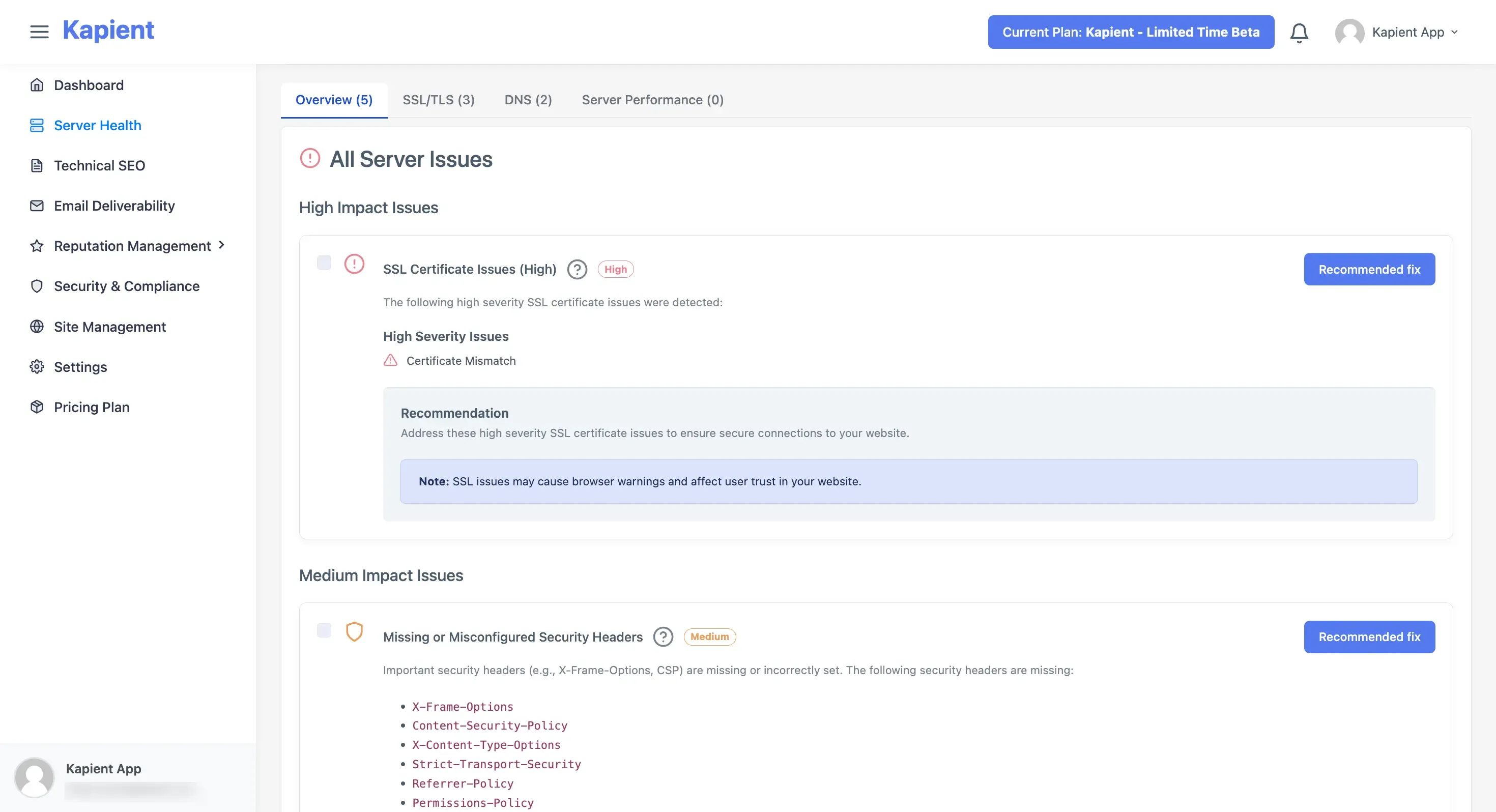
Kapient surfaces the silent failures from the decay timeline, from an SSL certificate about to lapse to a form that has quietly stopped delivering, before they turn into a client emergency.*
It tracks each site over time, so drift is visible.
Because the scans run on a schedule, you see a site's health as a trend, not a one-off snapshot. A slow creep in page load time or a newly appeared indexing issue shows up as a change you can act on, and the same history becomes the monthly report you send the client as proof the site is being actively cared for.
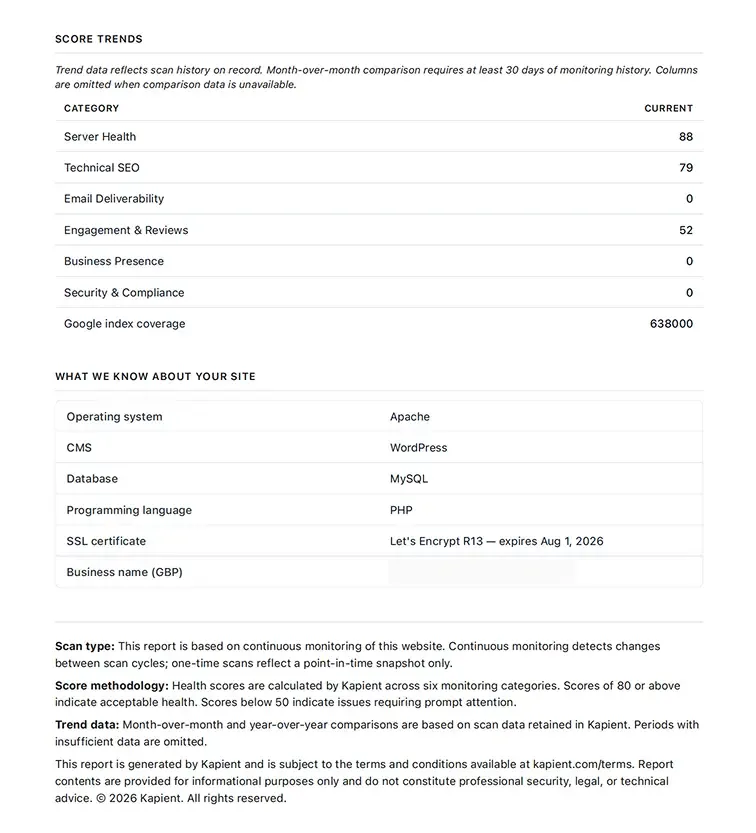
Continuous scans turn invisible drift into a visible timeline, which doubles as proof-of-value for the client.
Launch is not the end of the work. It is the moment the clock starts. The designers who understand that, and who put monitoring in place on day one, are the ones who catch the SSL expiry in month three instead of fielding the panicked call in month six.
Stop decay before your clients notice it Kapient watches every client site continuously across dozens of technical and quality factors, from SSL and broken forms to plugin failures, slow pages, and SEO issues, and tells you how to fix each one in plain English. Catch the problems on this timeline the day they appear, and turn the automated reports into proof your care plan is working. Start monitoring your client sites and stop the month-six panic call before it happens.
Frequently Asked Questions
How long does it take for a website to start having problems?
Almost immediately. Redirect and indexing issues can appear within the first two weeks, software update backlogs begin within the first month, and the first site-breaking failure, often an expired SSL certificate, commonly hits around month three. Decay is continuous from launch, not something that starts after a year.
Do websites really need ongoing maintenance?
Yes. A website depends on software, certificates, and search engines that all keep changing, so a site left untouched drifts out of alignment with them and degrades. Without maintenance, plugins go unpatched (a major security risk), certificates can expire, forms can silently break, and search rankings slip.
Why did my website suddenly stop working months after it launched?
The most common causes are an expired SSL certificate that failed to auto-renew, a plugin or platform update conflict from an accumulated update backlog, or a broken form or integration. These build up quietly over months and then surface all at once, which makes the failure feel sudden even though the decay was gradual.
Why is my contact form not sending emails even though it says success?
A form can show a success message while its emails silently fail to deliver, usually because of missing email authentication (SPF and DKIM), a mail server change, or a plugin conflict. Because the visible confirmation still appears, this is one of the most common failures to go unnoticed, sometimes for months, while leads are lost.
How often should a website be checked for problems?
Continuously is ideal, because the most damaging failures (an expired certificate, a broken form, a site outage) can happen at any time and cost you leads or traffic every hour they go unnoticed. At minimum, key items like SSL status, uptime, form delivery, and core updates should be monitored automatically rather than checked manually.
Is the web designer responsible when a site breaks after launch?
Legally it depends on the contract, but in the client's mind the designer is almost always the first person they call. This is why many designers include a maintenance or care plan in every project, both to protect the client's site and to make their own responsibility explicit and paid rather than assumed and free.
Written by
Khul Anwar
Growth
Khulanwar leads content and growth at Kapient, where the team helps small businesses and agencies keep their websites healthy, fast, and compliant. He writes about website monitoring, technical SEO, and the maintenance work that quietly keeps sites from breaking after launch.
Related articles

10 Common WCAG Failures and How to Fix Them
September 22, 2026
Website Accessibility for Agencies: Turning Compliance Into a Service
September 16, 2026
10 Best UptimeRobot Alternatives for 2026
September 10, 2026
How to Check if Your Website Meets WCAG Accessibility Standards
September 10, 2026