How to Remove Hacked Spam Pages That a Hacker Indexed on Your Domain
You searched your own site, or opened Search Console, and found hundreds or thousands of pages you never created, often in a foreign language, linking to scam or counterfeit stores. Your domain has been used to host SEO spam, and Google has indexed it. This is alarming, but it is a known and recoverable attack. This guide explains what happened, how to clean it completely, how to get the junk pages out of Google

Khul Anwar
Growth

TL;DR: If a hacker injected spam pages on your domain and Google indexed them, you are dealing with an SEO spam hack (often the "Japanese keyword hack"). Remove it in this order: take a backup, find and remove the malware that generates the pages, delete the spam pages so they return a 404 or 410 status, remove any fake sitemaps and unknown admin users, and do not block the pages with robots.txt because Google needs to crawl them to drop them. Then request recrawls in Google Search Console. Recovery takes weeks, and the single clearest early-warning sign is your indexed page count ballooning far beyond the number of pages you actually published.
You searched your own site, or opened Search Console, and found hundreds or thousands of pages you never created, often in a foreign language, linking to scam or counterfeit stores. Your domain has been used to host SEO spam, and Google has indexed it. This is alarming, but it is a known and recoverable attack. This guide explains what happened, how to clean it completely, how to get the junk pages out of Google, and how to catch it fast if it ever happens again, because the longer it runs, the worse the damage to your rankings and reputation.
What Actually Happened to Your Site
This is almost always a variant of what security researchers call the Japanese keyword hack (also called Japanese SEO spam or Japanese symbol spam), though the same attack appears with pharmaceutical spam, gambling spam, and other themes. The mechanics are consistent regardless of the language.
A hacker exploited a vulnerability, usually an outdated plugin, theme, or weak password, and injected code that auto-generates pages on your domain. These pages are built to rank for spam keywords and link out to affiliate scams, counterfeit goods, or phishing sites. The attacker is not interested in your business. They are borrowing your domain's existing trust with Google to rank their spam faster than a brand-new domain could.
Several things make this hack especially nasty:
- It is often cloaked. The spam pages frequently show normal content to you and spam only to Googlebot, so the site looks fine when you visit it. You discover it through search results, not by browsing.
- It creates a fake sitemap. Attackers commonly add their own sitemap file to push the spam pages into Google's index faster.
- It multiplies fast. What starts as a few pages can become hundreds or thousands within weeks, and severe cases have run into the hundreds of thousands.
- It adds hidden back doors. The hack usually installs hidden admin accounts and malicious files so it can regenerate even after a partial cleanup.
The reason it matters so much is what it does to your standing with Google. Your rankings drop because Google now sees your site as partly a spam site, possibly in the wrong language. You can get a manual action or a "this site may be hacked" label in search results.
And most of the spam URLs eventually return 404s, which further erodes the trust and authority your real pages depend on.
Step 0: Confirm It and Back Up First
Before changing anything, confirm the scope and protect yourself.
Confirm the hack. In Google, search site:yourdomain.com and page through the results. Unfamiliar URLs, foreign-language titles, or gibberish descriptions confirm it. In Google Search Console, check the Pages report and the Security Issues section, which may flag the hack directly.
Note the scale. Compare how many pages you actually published against how many Google has indexed. A large gap is the signature of this attack, and it is the number you will watch to confirm recovery later.
Take a full backup now. Files and database, before you delete anything. If cleanup goes wrong, you need a rollback point. Back up even though the site is compromised, a messy backup beats none.
Step 1: Remove the Malware That Generates the Pages
Deleting the spam pages without removing the malware is pointless, because the malware simply regenerates them. Kill the source first.
- Scan with a reputable security tool. A malware scanner or security plugin will identify most infected files. Run it before manual work
- Inspect the common hiding spots. On WordPress, that means the uploads folder, the active theme and child theme, must-use plugins, and core files like
index.php,.htaccess, andwp-config.php, looking for encoded scripts or unfamiliar code - Replace core files with fresh copies from the official source, so any modified core file is overwritten with a clean one
- Restore from a clean backup if you have one from before the infection, which is often faster and safer than hand-cleaning, provided you then patch the hole that let them in
If you are not comfortable editing site files, this is the step to bring in a developer or a professional malware-removal service. A half-cleaned site reinfects.
Step 2: Revoke the Hacker's Access
The attack left doors open. Close all of them, or the hack returns within days.
- Delete unknown admin users in your CMS. Attackers create hidden administrator accounts to regain entry
- Change every password: hosting, database, SFTP/SSH, CMS admin, CDN, and any API keys
- Check Google Search Console users and permissions. Attackers sometimes verify themselves as owners of your property so they can manipulate settings. Remove anyone you do not recognize
- Enable two-factor authentication on your CMS, host, and Search Console
- Delete fake sitemaps. Find and remove any sitemap file you did not create, since these exist only to index the spam
Step 3: Remove the Spam Pages From Google the Right Way
This is where most people make a costly mistake, so follow the order carefully. The guidance here follows Google's own instructions for fixing the Japanese keyword hack.
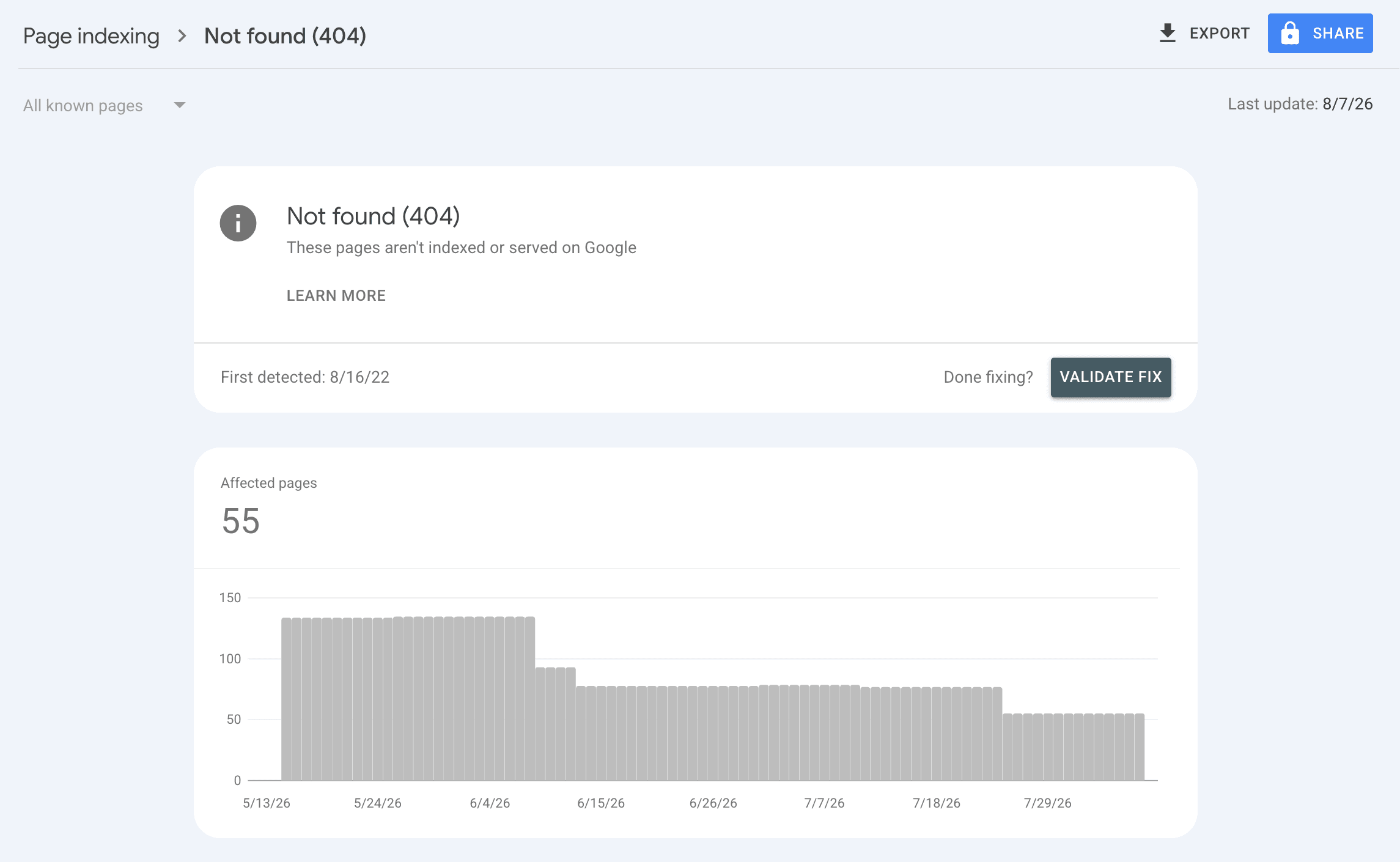
Delete the spam pages so they return 404 or 410. Once the malware is gone and the injected pages are removed, the URLs should return a "not found" (404) or "gone" (410) status. This is how Google learns to drop them from the index.
Do not block the spam URLs with robots.txt. This is the critical counterintuitive point. Blocking the URLs in robots.txt stops Google from crawling them, which means Google never sees that they are gone and keeps them in the index. Google must be able to crawl a page to remove it. Leave them crawlable so the 404/410 does its job.
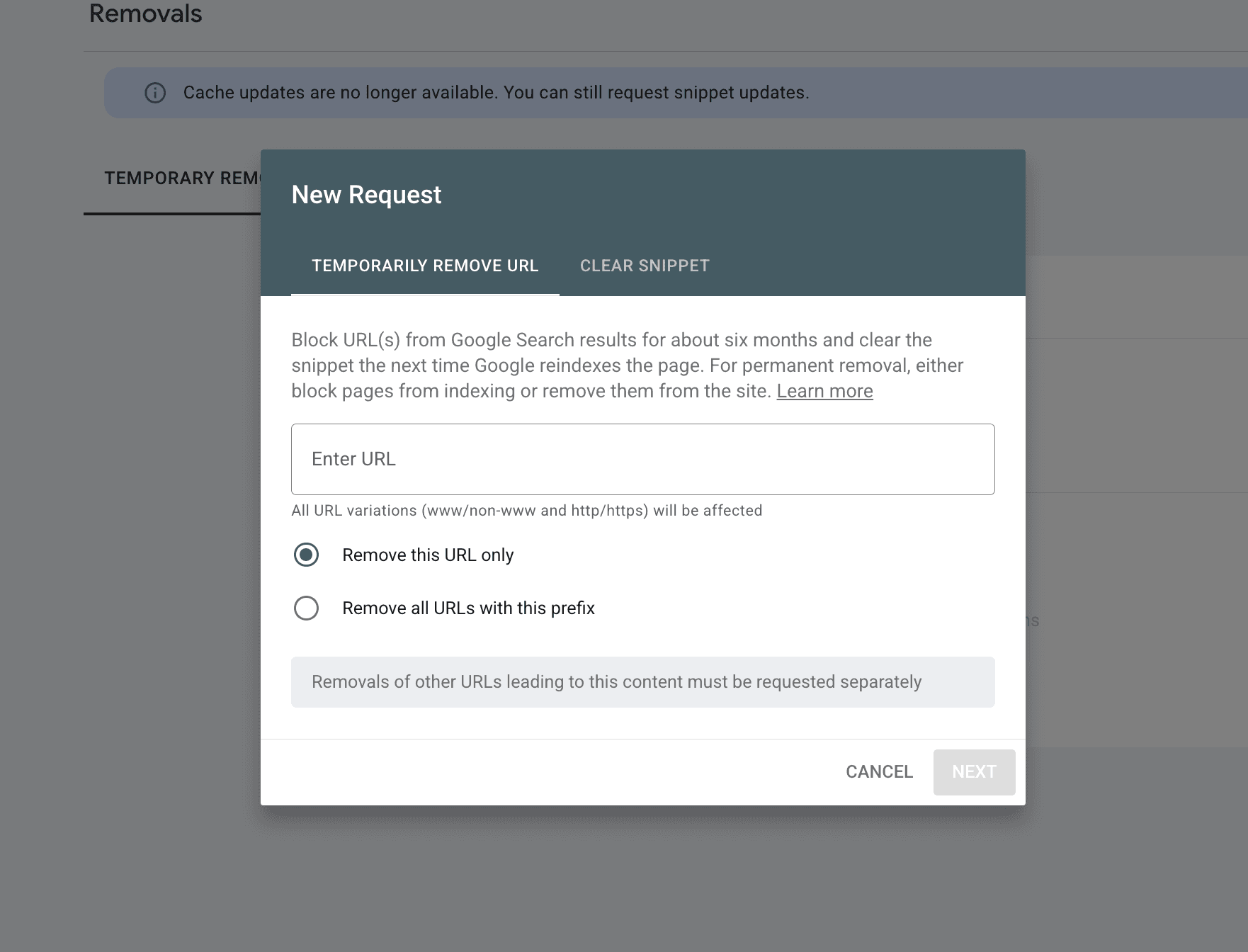
Optionally, use temporary removals to stop the bleeding. In Search Console under Removals, you can temporarily hide URLs from search results for about six months. This is useful for getting obvious spam out of public view immediately while the permanent 404/410 cleanup propagates. It is a stopgap, not the fix.
Request recrawls. Submit your correct, clean sitemap in Search Console to prompt Google to recrawl. As Google recrawls the dead spam URLs and sees the 404/410 responses, it removes them from the index.
Step 4: Recover and Confirm
Cleanup is not instant. Expect the process to take weeks as Google recrawls and reindexes.
- Request a review if you got a manual action. If Search Console shows a manual action or security issue, fix everything first, then submit a reconsideration or "request review" so Google can lift it
- Watch the indexed count fall. Your indexed page count should steadily drop back toward your real number of pages as the spam URLs are removed. This is the clearest single signal that recovery is working
- Monitor Search Console for weeks. Reinfection is common when the original vulnerability was not fully closed. Keep checking the Pages and Security Issues reports
- Rebuild real authority. Once clean, keep publishing genuine content and earning legitimate links to recover the rankings the hack cost you
Why This Hack Runs for Weeks Before Anyone Notices
Here is the uncomfortable pattern. The hack is silent by design. The site looks normal when you visit it because the spam is cloaked to show only to Googlebot. Nothing throws an error. The first sign is usually a slow, unexplained ranking drop, or a customer mentioning they saw something strange when they searched for you, and by then the spam has been multiplying for weeks and the index is flooded.
This is the same silent-failure problem that affects the rest of a website, mapped in our website decay timeline. The unpatched plugin that let the hacker in is the exact kind of debt that accumulates quietly after launch. And a hack is rarely the only thing wrong at once, since the vulnerability that allowed it usually sits alongside other neglected issues.
The single most reliable early-warning sign is one number: your indexed page count suddenly climbing far above the number of pages you actually published. If you have 50 real pages and Google is suddenly indexing 500, something is generating pages on your domain. Almost nobody watches that number, which is why the hack gets weeks to run.
How Kapient Catches This Early
This is exactly the signal Kapient is built to surface. As part of its continuous scan across more than 74 technical and quality factors, Kapient runs a Google Index scan that compares how many pages are in your sitemap against how many Google has actually indexed, and flags the condition when the two diverge.
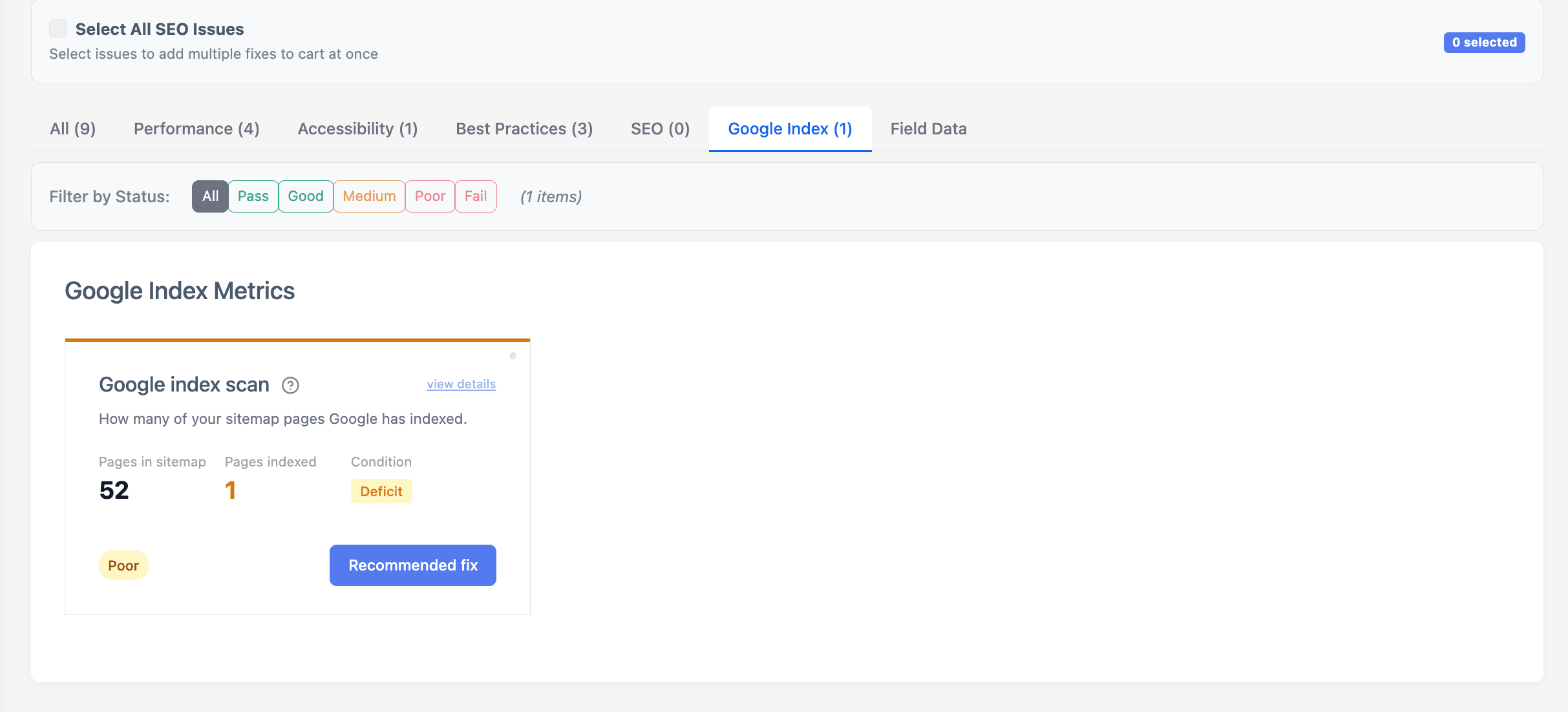
Kapient's Google Index scan compares sitemap pages against indexed pages, so a spam-driven spike in indexed pages surfaces as an early alert.
For a normal site, that check catches the opposite problem, real pages that are not getting indexed. But for a hacked site, it is an early alarm: when injected spam pages start getting indexed, your indexed count climbs far above your sitemap count, and the scan flags the deficit between what you published and what Google sees. Instead of discovering the hack weeks later through a ranking drop, you see the divergence while it is still small.
Because Kapient scans continuously, it also watches the conditions that surround a hack: it monitors security issues, tracks your pages and technical SEO, and checks the factors that a compromise tends to disturb all at once.
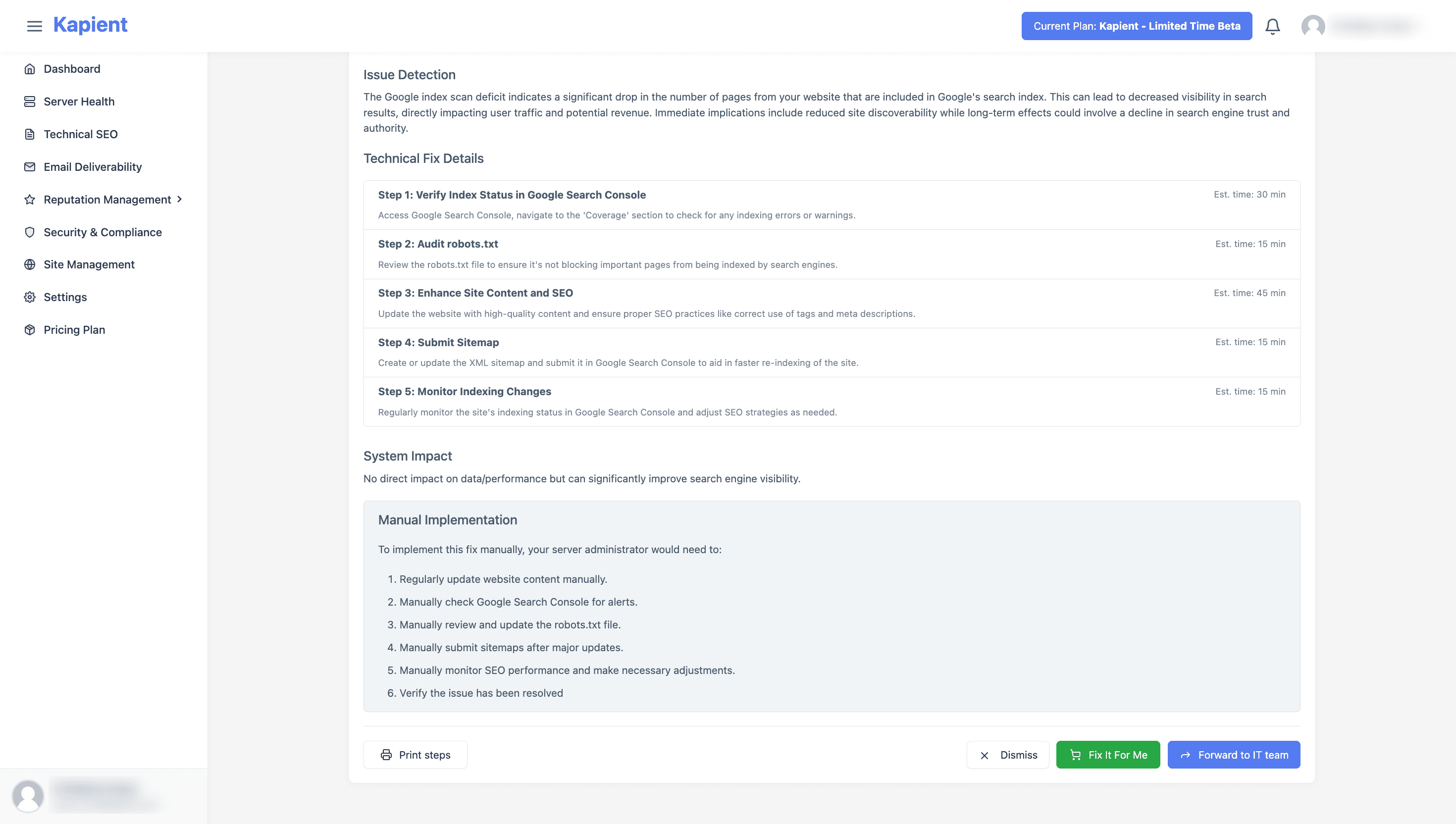
When something is flagged, the issue in your Kapient dashboard carries a "Recommended fix" button that reveals plain-English steps for your specific setup, so you go from "something is wrong" to a clear next action without a research spiral in the middle of a stressful incident.
For a freelancer or agency, this is the difference between catching a client's site the day the index starts filling with spam and getting a furious call a month later asking why the client's business now shows up in Japanese on Google. Catching it early turns a reputation-damaging, multi-week recovery into a contained cleanup, which is exactly the kind of protection a website care plan exists to provide.
Prevention is the same discipline that catches it: keep everything patched, enforce strong passwords and two-factor authentication, use a web application firewall, keep secure backups, and monitor continuously so a breach is caught in days rather than weeks.
Would you know if your domain started indexing pages you never made? Kapient continuously monitors your indexed pages, security, and 70+ other health factors, and alerts you the moment something is off, with plain-English fixes. Start monitoring free and catch a hack while it is still small.
Frequently Asked Questions
Why does my website have pages I did not create indexed on Google?
Almost certainly because your site was hacked and injected with SEO spam, commonly the Japanese keyword hack. An attacker exploited a vulnerability and installed code that auto-generates spam pages on your domain to rank for their keywords, borrowing your domain's trust with Google. The pages are often cloaked, so they appear only in search results, not when you browse your own site.
How do I remove hacked spam pages from Google?
Remove the malware first so the pages stop regenerating, then delete the spam pages so their URLs return a 404 or 410 status. Do not block them with robots.txt, because Google must crawl them to see they are gone.
Submit your clean sitemap in Search Console to prompt recrawls, and optionally use temporary removals to hide the worst URLs immediately while the permanent removal propagates.
How long does it take to recover from an SEO spam hack?
Cleanup of the site itself can be done in a day or two, but getting the spam pages out of Google's index and recovering rankings takes weeks as Google recrawls and reindexes.
Recovery is slower if you received a manual action, which requires a reconsideration request after cleanup. Watching your indexed page count fall back toward normal is the clearest sign it is working.
What is the Japanese keyword hack?
It is a common SEO spam attack that injects auto-generated, often Japanese-language pages onto a compromised website to rank for spam keywords and link to scam or counterfeit sites.
It primarily targets WordPress and other CMS sites through unpatched vulnerabilities, frequently adds a fake sitemap and hidden admin accounts, and cloaks the spam so it shows mainly to Googlebot.
Should I block the hacked pages with robots.txt?
No. This is a common and costly mistake. Blocking the URLs in robots.txt stops Google from crawling them, which means Google cannot see that they now return a 404 or 410 and keeps them in the index indefinitely. Leave the URLs crawlable so Google can recrawl them, see they are gone, and drop them from search results.
How can I tell if my site is hacked before Google penalizes me?
The earliest reliable sign is your indexed page count climbing far above the number of pages you actually published. Search site:yourdomain.com periodically, watch the Pages report in Search Console, and ideally use continuous monitoring that compares your sitemap against your indexed pages, so a sudden divergence is flagged within days instead of discovered weeks later through a ranking drop.
Written by
Khul Anwar
Growth
Khulanwar leads content and growth at Kapient, where the team helps small businesses and agencies keep their websites healthy, fast, and compliant. He writes about website monitoring, technical SEO, and the maintenance work that quietly keeps sites from breaking after launch.
Related articles
SEO Metrics: The 15 That Actually Matter in 2026 (and the Ones to Ignore)
August 21, 2026

Website Migration Checklist: The Complete Guide to Migrating Without Losing Traffic
August 19, 2026

SSL Certificate Expired: How to Fix It and Stop It Happening Again
July 24, 2026

How to Fix a WordPress Contact Form Not Sending Emails
July 23, 2026